Callback request via Mail

Denk-IT Tech

Joined
Feb 1, 2021
Messages
1
Reaction score
1
Hello all,

A Sales Lead is requesting the possibility to have a “call back request mail” option similar to what he has in his current system.

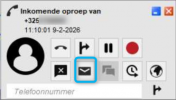
  • When receiving a call, they have an “E‑mail” button that triggers a mailto action with a prefilled subject and message containing the caller ID/number/name of the caller.1770633371471.png
  • When pressed, the default e‑mail program opens with the subject and message already prepared.
  • The callee then has the option to send this mail to a recipient/colleague of their choice.
Does anyone have an idea or direction on how to implement this or replicate this behavior in the easiest way?
 
  • Like
Reactions: ArneDery
This could be solved with an crm, not with 3cx directly.
 
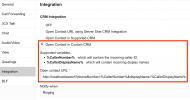
Actually, you could create a VERY small local web app on a user's desktop (listening on localhost in this image) and use that as a bridge between the web client and the email program from here:

1770640048454.png

...possibly by simply getting the web app to somehow launch a "mailto" url, maybe. It's about imagination ;)
 
Here's a simple python idea - it's not intended to be a solution, but a simple way to start you off. I've not tried this, so YMMV...

Python:
from flask import Flask, request
import webbrowser
import urllib.parse

app = Flask(__name__)

@app.route('/search')
def search_call():
    # 1. Retrieve the query parameters from 3CX
    phone_number = request.args.get('phoneNumber', 'Unknown Number')
    display_name = request.args.get('displayName', 'Unknown Caller')

    # 2. Define the email content
    subject = "Your call"
    body = f"Hi. I received a call from {display_name} with number {phone_number} - can you please provide me with some details of your request? Regards, John"

    # 3. Format the mailto link with URL encoding to avoid glitches
    # We leave the "to" field empty so you can fill it in manually
    params = urllib.parse.urlencode({'subject': subject, 'body': body})
    mailto_link = f"mailto:?{params}"

    # 4. Trigger the default system handler
    webbrowser.open(mailto_link)

    return f"Processed call from {display_name}. Mail client opened.", 200

if __name__ == '__main__':
    app.run(port=80)

Also in powershell:

Code:
Add-Type -AssemblyName System.Web

$port = 80
$url = "http://localhost:$port/search/"

$listener = New-Object System.Net.HttpListener
$listener.Prefixes.Add($url)

try {
    $listener.Start()
    Write-Host "Listening for 3CX calls on $url ..." -ForegroundColor Green
    Write-Host "Press Ctrl+C to stop the server."

    while ($listener.IsListening) {
        # Wait for a request
        $context = $listener.GetContext()
        $request = $context.Request
        $response = $context.Response

        # These correspond to ?phoneNumber=...&displayName=...
        $phoneNumber = $request.QueryString["phoneNumber"]
        if (-not $phoneNumber) { $phoneNumber = "Unknown Number" }
        $displayName = $request.QueryString["displayName"]
        if (-not $displayName) { $displayName = "Unknown Caller" }

        $subject = "Your call"
        $body = "Hi. I received a call from $displayName with number $phoneNumber - can you please provide me with some details of your request? Regards, John"

        $encodedSubject = [System.Web.HttpUtility]::UrlEncode($subject)
        $encodedBody = [System.Web.HttpUtility]::UrlEncode($body)
        $mailtoLink = "mailto:?subject=$encodedSubject&body=$encodedBody"

        Start-Process $mailtoLink

        $buffer = [System.Text.Encoding]::UTF8.GetBytes("Processed call from $displayName. Mail client opened.")
        $response.ContentLength64 = $buffer.Length
        $response.OutputStream.Write($buffer, 0, $buffer.Length)
        $response.Close()
       
        Write-Host "Handled call from $displayName ($phoneNumber)" -ForegroundColor Cyan
    }
}
finally {
    $listener.Stop()
}
 
Last edited:
For the sake of correctness, these code snippets are ONLY intended to be food for thought - please be RESPONSIBLE when implementing any customizations, and make sure that they are appropriate for your environment, and secured from any potential abuse.
 
Actually, you could create a VERY small local web app on a user's desktop (listening on localhost in this image) and use that as a bridge between the web client and the email program from here:

View attachment 50935

...possibly by simply getting the web app to somehow launch a "mailto" url, maybe. It's about imagination ;)

We've explored this option, but then you lose the CRM integration for all other functionalities. The prupose is to make sure if you can't complete a transfer you have to option to then start the mail, towards a colleague with the current call or from the history call information.
 
Maybe I'm missing something, but to Kevin's point, if you are already using this feature (calling a URL and passing in parameters), that does not preclude you from having your application pass the same data along in a separate web request, right? You have complete control over what your application does with the data once it receives it.

3CX > My App > CRM

For that matter, you could have "My App" pass the same data along to CRM1, CRM2, App3, etc. If anything, this approach gives you the ability to push data to an unlimited number of additional systems.
 
So, to spell it out...

The powershell service can be expanded into a "middleware", if you like, that can then launch multiple secondary processes, instead of just one. The possibilities are almost without limit.
 
Exactly.