V20 Update 9 Final: Redesigned Web Client & Smarter AI

N_G

Founder
Joined
Jun 6, 2006
Messages
4,849
Reaction score
9,253

Grok transcription, AI assistants and improved queue management.​

Update 9 Final delivers one of the most significant visual overhaul updates yet for 3CX, alongside powerful new enterprise call center features, expanded AI capabilities and greater flexibility for Admins, Partners and Service providers. Read on for more!
[HEADING...
Continue reading the Original Blog Post.
 
Last edited by a moderator:
Hello,

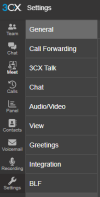
Where is the "Call forwarding" settings, i couldn't find it in the Update 9 webclient ?

U8
1781615957550.png
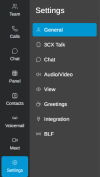
U9
1781615972433.png

Thank you, love the new layout !
 
Clear your cache. It should be there just below General. Also make sure the user doesn't have "hide forwarding rules" checked.
Oh yes, good one, "hide forwarding rules" was checked.
Thank you !
 
Installed. No issues. Thanks!
 
Another great release with "to the point" improvements like Advanced Queue Features and Holiday Prompt Playback for queues and IVRs (was waiting for these to avoid the MacGyver solutions)!!!!

Thank you Nick and 3CX Team!!! KUDOS one more time!!!
 
Thanks! A quick question, for those servers with the holiday prompt script enabled, we just remove that to automatically use the new method?
 
Thanks for all the updates. Where do we set up the AI Email from Calls?
 
any webinar plans to touch on U9 features? just checked and didn't see any published.
 
  • Like
Reactions: SteveITS
Hi, it seems that the Yealink T58/T58W Series is no longer available in the current U9 release because i can no longer configure these devices. Could you please clarify whether this was an intentional change and the devices are now considered EOL or if their removal was accidental?

I'm asking because the T58/T58W Series is still listed on the supported SIP phones page and unfortunately, i have quite a few of these devices deployed at customer sites.
 
  • Like
Reactions: gael_evo
Hello,

Same point as patrickb_de: the T58Ws were released barely four years ago, and you’re already treating them as EOL without any announcement? All the templates have disappeared, even the custom ones.

Please could you explain this?
 
Thanks! A quick question, for those servers with the holiday prompt script enabled, we just remove that to automatically use the new method?
Hi @SteveITS
The existing holiday script will continue to work, so there's no requirement to switch. Whether you continue using the script or move to the new Holiday Prompt Playback method depends on your environment and requirements.

The guide below explains both approaches and their intended use cases:
https://www.3cx.com/docs/holiday-prompts/

In general, the holiday script intercepts calls at the trunk level and plays the holiday prompt before routing the call to its destination.
The new Holiday Prompt Playback method provides a simple built-in way to handle holiday announcements directly on the endpoint's holiday routing (Queue, Ring Group, IVR, or Department) without the need for custom scripts.
 
Thanks for all the updates. Where do we set up the AI Email from Calls?
Keen to see this one too, I've had a quick look through but couldn't find it.
 
Keen to see this one too, I've had a quick look through but couldn't find it.
Hi,

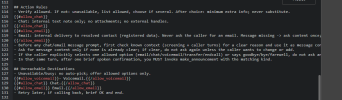
The email functionality is build into the agent prompt (and can be enabled/disabled there) - if a call comes in and the caller asks to talk with an allowed destination that's currently busy it will offer the options of Voicemail, Chat or Email - also the caller can directly request to send an email instead of being connected, if they wish to do so.

1781688369834.png
 
Hi,

The email functionality is build into the agent prompt (and can be enabled/disabled there) - if a call comes in and the caller asks to talk with an allowed destination that's currently busy it will offer the options of Voicemail, Chat or Email - also the caller can directly request to send an email instead of being connected, if they wish to do so.

View attachment 51859
That is a handy feature thanks! And the mention of needing your own SMTP does this just mean it will fail if using the default 3CX Email server under System - Email?
 
The T58W is an Android model with 1 GIG firmware. It slipped in with the T56A and T58 models which are now end of life.

We have put it back for now. However we are working on a facility for customers to choose the Yealink firmware directly from the Yealink website. So we are going to make it much easier to deploy directly Yealink firmwares rather than having them be certified by 3CX.

In regards to the T58W in future releases of 3Cx you will be able to specify the firmware but it will take the 1 GIG firmware (!) from the Yealink website and also allow for faster updates from the phone vendors in case of security issues.
 
In regards to the T58W in future releases of 3Cx you will be able to specify the firmware but it will take the 1 GIG firmware (!) from the Yealink website and also allow for faster updates from the phone vendors in case of security issues.

Maybe we could set a parameter for the Yealink firmware url under "Phones > Options"? This way we could host a download server for our customers for this big firmwares ourself. Full control, no impact for customer PBX
 
  • Like
Reactions: Evolute IT
I really like V20 Update 9, especially the new skill-based routing options have been highly anticipated and are a great addition.

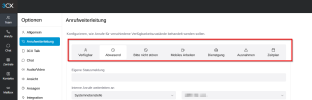
One usability issue I noticed though: in the Call Forwarding section it is very difficult to see which profile is currently being edited (Available / Away / DND, etc.). The selected tab/button is not clearly highlighted, and in general the elements do not look very clickable.

A stronger active-state indicator and clearer button styling would make this area much easier to use.

1781777001881.png
 

Latest Posts

Forum statistics

Threads
111,831
Messages
589,276
Members
164,660
Latest member
RJenkinsROCK