3CX Call cuts when Teams Video/Audio Call comes in

Narf23

Forum User
Joined
May 12, 2023
Messages
2
Reaction score
0
When on a Windows 3CX Desktop App call and someone in my team tries to communicate via Microsoft Teams (Video or Audio Call) the 3CX call disconnects.
Same happens other way - if on a Microsoft Teams Video Call and Windows 3CX Desktop App calls in the Teams call disconnects.

I am having to either change Teams to Do not Disturb or 3CX to Do not Disturb depending which call I am on.

Is there away to allow both work at the same time? or maybe a feature to have either automatically Do not Disturb while on a call?
 
Are you using a headset? Sometimes headset software sees the other call come in, sees it wasn't answered, sends the signal to turn off the headset because the call wasn't answered, which in turn signals the other software to disconnect the call (because the headset turned off).
 
Yes - I am using a USB Jabra headset - I will test with a different brand and see if this helps.

Thank you
 
You can try also to switch the integration options within the 3cx desktop app > audio video section, to use the specific Jabra integration option, but as per the blog post, this is not something that we suggest doing, to use both apps open at the same time using the same headset.

https://www.3cx.com/blog/docs/webhid-headset-integration/

Can I Use a WebHID Headset with Multiple Apps on the Same PC?
Yes and no. Generally speaking, this will cause problems. If you have, for example, the Teams client and the 3CX client open simultaneously and receive calls on both, you are asking for trouble.

I can, therefore, only suggest using either the Teams or the 3cx app and not both at the same time. The last suggestion is to switch the integration to Jabra using the latest version (update 7) or use a supported headset (yealink) for which this issue is not present.

 
  • Like
Reactions: Evolute IT
Hi, i still have this issue with a jabra 370, current Desktop App and Jabra Direct Software. Is there a Solution?
 
This has not been changed as you need to choose which application to use.
 
Even if I turn off the headset integration, I get the same error
 
But both the Teams and 3CX Client are running?
 
Yes, both apps are used and i am in a 3CX call. A TEAMS Call comes in an ends the current 3CX Call. This behavior is not on every customer we have, only this one
 
If Teams or 3CX is closed(exit) the issue is the same?
 
Yea - same issue. Avraam said to me, that this behavior ist known by 3CX but its strange, that some users have this issue and other user don't have it
 
Is there any additional software of the headset installed on those machines?
 
Have you tried to also remove the software?
 
I encountered a similar issue with our communications apps on PC having a similar effect to my device.
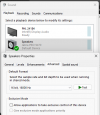
It may or may not be of assistance (and may entirely have been a coincidence) but I turned off the "Allow applications to take exclusive control of this device" under the computer's sound settings for my headset and haven't had an issue since.
1705628843334.png
 
  • Like
Reactions: TheodorosG_3CX

Members Online Now

No members online now.

Forum statistics

Threads
111,831
Messages
589,277
Members
164,660
Latest member
RJenkinsROCK