


- Joined
- Jan 5, 2022
- Messages
- 3
- Reaction score
- 7
Ambiguity. This question seems to silly for me to ask, but ask I will.
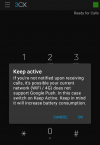
The Keep Active toggle on my phone app does not simply say "On" and "Off". (it should, imho.)
From a default state, tapping Keep Active once brings up the small banner message. I think that means I just now turned on Keep Active.
Tapping again shows no response.
Tapping again brings up Keep Active banner message.
The ambiguous wording on this banner -- "In this case switch on Keep Active" -- after I think I just did that, reads like advising my shop and tow motor users to toggle it again to choose to turn it On.
Which is "on" and which is "off"?
I am fairly certain THIS MESSAGE means "On" and the tap that has no response means "Off".
For anyone curious, we use rugged Blackview phones in the shop, on WiFi-only, no SIM card.
For unknown reasons they sometimes don't ring when Keep Active isn't on. We don't mind the slightly higher battery drain.
The Keep Active toggle on my phone app does not simply say "On" and "Off". (it should, imho.)
From a default state, tapping Keep Active once brings up the small banner message. I think that means I just now turned on Keep Active.
Tapping again shows no response.
Tapping again brings up Keep Active banner message.
The ambiguous wording on this banner -- "In this case switch on Keep Active" -- after I think I just did that, reads like advising my shop and tow motor users to toggle it again to choose to turn it On.
Which is "on" and which is "off"?
I am fairly certain THIS MESSAGE means "On" and the tap that has no response means "Off".
For anyone curious, we use rugged Blackview phones in the shop, on WiFi-only, no SIM card.
For unknown reasons they sometimes don't ring when Keep Active isn't on. We don't mind the slightly higher battery drain.


