3CX Transcription using OpenAI - Blank or missing transcripts

nathan0707

Silver Partner
Basic Certified
Joined
Sep 3, 2019
Messages
99
Reaction score
16
We have random calls that will show no transcription, we are using OpenAI and for the same user it will work for most calls but for some reason randomly have a few blanks, the recording is there just no transcription
 
This issue might happen because of the audio quality, formatting issues and language or temporary API timeouts with OpenAI. If the recording is present but there's no transcription, it's likely the API couldn’t process it properly at that moment. You might want to check your logs for any errors or timeouts during those calls, also did you try to listen to those recordings as a first step to investigate ?
 
This issue might happen because of the audio quality, formatting issues and language or temporary API timeouts with OpenAI. If the recording is present but there's no transcription, it's likely the API couldn’t process it properly at that moment. You might want to check your logs for any errors or timeouts during those calls, also did you try to listen to those recordings as a first step to investigate ?
Yes audio is there, I guess there will be a failure rate that it does not attempt to retry it?
 
Yes audio is there, I guess there will be a failure rate that it does not attempt to retry it?
I would advise you to check the response from the API and check If you're hitting rate limits or usage caps on OpenAI’s API.
 
  • Like
Reactions: Evolute IT
How can I check that, we still have many calls not posting with a transcription. I have internal calls with no transcript same 2 extensions called each other some calls transcribe and some don't. please assist.
 
In your situation, you may want to take a look at our 3CX Recording Manager tool. We provide the ability to re-analyze recordings so if you recording did not successfully transcribe, no problem, you can request the analysis be performed again.

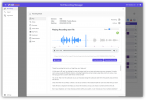
Our 3CX Recording Manager tool now has a extensive list of AI feature for analyzing your phone calls. Now you can use AI to score how well your agents handled a call (or have humans provide a score too). You can even ask different questions based on department membership. Our "Ask AI Anything" feature does just that -- lets you create a list of questions (prompts) and have calls automatically analyzed.

1747947692990.png
There are a long list of enhancements including:

  • No need to give users 3CX Console permissions or extra 3CX permissions
  • Granular access rights so a user can only see the recordings you authorize
  • Visual representation of the audio -- critical for performing quality assurance tasks
  • Transcriptions separated by speaker into separate paragraphs (see example above)
  • Easily specify who's recordings are automatically analyzed (you can always analyze recordings ad-hoc)
  • Automatically analyze a subset of of agents calls by day, week, month, quarter, or year
  • Skip analyzing recordings that are too short or too long
  • Facilitate both AI and Human-based agent scoring
  • See how agents improve their scores over time
  • Identify agents that need further training due to poor knowledge scores
  • Identify agents that frequently get poor courtesy scores
  • Example prompts:
    • List of task assignments / action items
    • List of key points discussed
    • Identify appointments or due dates
    • Call sentiment -- not just a score but why the score
    • How the agent could more effectively overcome objections
    • How the agent can close more sales
There truly are no limits to what information you can extract from your phone calls, and see how things change over time. You can even search for key words or phrases in your recordings.

I could go on, because there is lots more we can do, but I've probably already exhausted your patience, so I'll stop here. Want a one-on-one live demo? https://booking.voiptools.com
 
thanks voiptools but this is something 3CX should fix.
 
I suspect this is an issue with one of the following: Your OpenAI account (rate limits maybe?), the OpenAI API unable to service your request, or a network connectivity issue . I am confident that this is not a problem with 3CX.
 
  • Like
Reactions: Evolute IT

See below openai does not log these errors on there end how can I review the api logs on the 3cx side?

How to Get Visibility Into Rate-Limited Requests​

Because OpenAI doesn’t expose rate-limit logs, you need to add client-side logging in your application.

✅ Log These on Your Side:​

  • Response HTTP status codes (especially 429 and 503)
  • Rate limit headers in responses:
 
Look into 3CXSystemService.log, SPEECH tag
 

Members Online Now

No members online now.

Forum statistics

Threads
111,831
Messages
589,277
Members
164,660
Latest member
RJenkinsROCK