604 Error With Flowroute Incoming Calls

Status
Not open for further replies.

ocee

Trial User
Basic Certified
Joined
Feb 28, 2014
Messages
3
Reaction score
0
Having an issue with inbound calls with 3CX Hosted and my new Flowroute SIP trunk. I added the trunk last week using the Flowroute template with it's defaults and the "+" and 11 digits like the update says. It was working when I set it up a few days ago, but now it's not receiving any inbound calls. Flowroute shows a 604 error.

How do I fix this?
 
Hi @ocee

Does your trunk appear as registered? Did you change anything that could cause the trunk to break? If not and based on the error you are seeing I think you should also contact Flowroute for assistance. 604 Does not exist anywhere usually means that the provider does not know where to route the call.
 
Hi @ocee

Does your trunk appear as registered? Did you change anything that could cause the trunk to break? If not and based on the error you are seeing I think you should also contact Flowroute for assistance. 604 Does not exist anywhere usually means that the provider does not know where to route the call.
Yes, Flowroute registration status shows that it's registered with the proper 3CX IP address and Flowroute PoP. I have changed nothing from the time we originally set it up, calls just stopped coming thru and the Flowroute STATS shows 604 (Unavailable No trunk or registration).
 
Does it also show registered on the 3CX side? Did you contact Flowroute to see if there is something wrong on their end?
 
Hey there copy this and you will be working 2FC3E008-C5D8-4EDE-848C-EDDE861229A7.png
 
Hey there copy this and you will be working
These are the old settings of the template. If you use these you will need your numbers added in the PBX without "+". So if you also use SMS you will have a very hard time with number formatting.
So I would recommend using our new template to avoid any issues
 
These are the old settings of the template. If you use these you will need your numbers added in the PBX without "+". So if you also use SMS you will have a very hard time with number formatting.
So I would recommend using our new template to avoid any issues
We have had issues with outbound caller id name but the new template would not allow us to receive calls and when we looked at an older system that hadn’t updated we saw this was the only difference “Request line: user part”. That was the only change to the default template and then we could take calls but we do have an issue with CNAM
 
We have had issues with outbound caller id name but the new template would not allow us to receive calls and when we looked at an older system that hadn’t updated we saw this was the only difference “Request line: user part”. That was the only change to the default template and then we could take calls but we do have an issue with CNAM
The change in the template was to allow for numbers to be added in E164 format (+1XXXXXXXXXX). You probably used the new template and added your numbers without the + hence the issue.

For CNAM, you should speak with Flowroute. They should tell you what they expect you to send to have the feature working on their side. The PBX will send whatever is configured to send.
 
Thank you, this was helpful. Last time I spoke with flowroute about the CNAM issue they suggested I reach out to 3CX for proper configuration. Ugh
 
If you have something configured on Flowroutes side and you want us to instruct you on how to not send something from 3CX we can do so. But I believe that in the US at least providers override the callers name based on the caller ID.
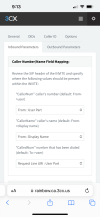
As a test navigate to your trunk settings / Outbound parameters and set the "From: Display Name" to "Custom Field" and leave it empty. Make a note of your current settings so you can revert later.

1669278149912.png

Make a few calls and let us know how it goes.
 
Status
Not open for further replies.

Latest Posts

Members Online Now

Forum statistics

Threads
111,831
Messages
589,276
Members
164,660
Latest member
RJenkinsROCK