Activate.3cx.com can not be reached

Status
Not open for further replies.

Techops

Customer
Joined
Feb 5, 2018
Messages
45
Reaction score
0
Upgraded an onprem from v16 to v18.

Uninstalled v16 > installed v18 > restored from backup

The whole process finishes but it ends in this error

3CX failed to establish a TCP connection to activate.3cx.com.
Ensure that the local or border firewalls are configured to allow outbound traffic to activate.3cx.com


The 3cx computer, windows, can resolve and ping activate.3cx.com. It can also load a blank webpage at https://activate.3cx.com

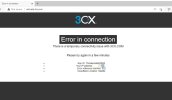
However, trying to access non-https, http://activate.3cx.com results in the attached error.

Any help would be greatly appreciated

.
 

Attachments

  • Screenshot_101822_083020_PM.jpg
    Screenshot_101822_083020_PM.jpg
    204.7 KB · Views: 34
If you set the primary DNS to 8.8.8.8 are you able to proceed?
 
Tried that and unfortunately, no. That doesn't seem to help.
 
Are you able to nslookup activate.3cx.com? Have you also checked for port 443?
 
Yeah, nslookup resolves to two addresses. How do you mean check for port 443?
 
You need to ensure that there is nothing blocking outbound traffic to activate.3cx.com on tcp port 443 and there is no proxy or any dpi security services enabled on your network firewall.
 
Ah, right right. I'm able to load a blank page when trying https://activate.3cx.com

I believe this means the connection is established? Versus "can't connect" or something like that.

I also can load google's front page via https and can telnet to activate.3cx.com on port 443

Thank you for the your help in this by the way.
 
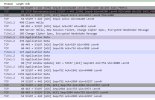
I did a packet capture and it looks like the 3cx starts the SYN to Activate, then gets the SYN/ACK but never completes the Handshake with the last ACK to Activate.

Does this sound like a local server issue or a Firewall issue?
 
There will be a few more parts to the transaction particularly a certificate handshake starting with client hello and then server hello followed by application data.

You can filter using DNS to see which address is resolved from your DNS response towards activate.3cx.com

Use the IP address in the filter in Wireshark to get only the traffic related to the aviation process.
 
Ah, more parts, got it.

Looking at wireshark again, it seems the initial handshake TCP connection never gets established. That has to happen first then the TLS handshake occurs?
 
Try changing the primary DNS on the server to 8.8.8.8 with no secondary and reboot or if windows flush the dns.

Run another capture and open a new tab into the management console.

Access the license section under the management console > settings, press Edit and make sure the required fields are filled in and press ok.

Check the capture as before, same result?
 
I'll give those points a go and let you know.
 
This time the trace looks like it's working but still getting the same error in the console.
 

Attachments

  • trace.jpg
    trace.jpg
    114.5 KB · Views: 36
Talked to our ISP who manages the firewall and they note that they can see the data being sent to 3cx but it doesn't seem to return. Any chance there's an issue with your activation servers?
 
There are no issues with the activation server, and going by the capture there is traffic both to and from port 443 so traffic is definitely flowing in both directions.

Also as per capture it should have activated.

I suggest opening a ticket with 3cx support so that we can check this further.
 
Okay, I'll do that. Thanks for the confirming, the capture does seem like it should have done the job.
 
Guys I have done everything recommend in this article but am facing the same issue for more than 24 hours and this is a PABX running a call center for sales
 
Hey There, we had two different issues on two different instances. Here's what we did, maybe they'll help you.

  1. InstanceA just wouldn't connect no matter what so we ending up building a new 3CX VM and restoring from backup. Worked on the first try. I can only assume something was corrupted in the network stack?

  2. InstanceB wouldn't resolve activate.3cx.com. Found this out by shelling into the machine and running Dig. Changed the DNS from local to 8.8.8.8 and that worked. Had to reboot the machine though, fyi.
 
Status
Not open for further replies.

Forum statistics

Threads
111,974
Messages
590,081
Members
164,899
Latest member
mazet