• We do not provide troubleshooting help for unsupported phones. Please try with a supported phone.
  • V20 Update 10 Alpha Learn more

Adding Fax Extension Now Gets Block Wan Request In V20

Status
Not open for further replies.

illcsales

Bronze Partner
Joined
Jan 21, 2020
Messages
261
Reaction score
149
Have a long-time client who uses a desktop fax program as a 3CX extension has worked great over many versions/years and after upgrading from V18 to V20 we discover one more configuration/option has been removed/ altered.

How we discovered this was when we went into try to replicate for another client after getting a block wan request is on, we started to explore and found yet another "if you upgrade it will still work" but going forward you have to figure it out because settings and screens are missing/ changed.

I like many of the new features, but this is getting to be a bit challenging with so many undocumented changes.

So, we have a new fax extension format great, problem is there no way to turn off block want just basic config info.

So, let's try to create an extension like we have done in the past problem no generic authentication info i.e. uid password, just specific Ip phones.

Any ideas on how to get around this would be helpful for two reason an existing client that is working but if there is a problem or they need to increase capacity and two it worked before I saw no mention of many of the changes, we are now experiencing and they were not called out in the alpha and beta testing change logs, maybe I missed it.

Thank you for your thoughts.
 
Die you configured split dns correctly? Registrations from wan side are not supported anymore.
 
Thank @bitn2, Hosted so not applicable. This about the changes since V18 as settings are no longer available in V20 grandfathered systems continue to work but replicating same setup on a new V20 is not evident.
 
You need to use an SBC for hosted, did you configured your fax extension correct over sbc?
 
We have a sbc working just fine, this is not an ata but fax through a VOIP provider one that has been working since like ver 10 i think, that was upgraded to V20 (I should mention I cannot duplicate or edit the extension in V20 so for TS this could be a problem in the future)
All we are trying to do is replicate that configuration on another system but after Ver 20 certain settings appear to be removed like a generic extension where uid and password were generated without needing a phone and the new fax extension seeming are designed for lan use as we are getting Block Wan Flag when deployed with no place to turn it off, hence the post of our question above.
 
You need to use an sbc for that. You get the user an password for the fax extension an need to provision this fax against the ip from the sbc. than it will work.
 
@bitn2 not sure if you saw this part "the new fax extension seeming are designed for lan use as we are getting Block Wan Flag when deployed with no place to turn it off, hence the post of our question above." the sbc plays no roll here.
We are not using an SBC for the extension in the system that is working that was upgraded to V20.
Sounds like this has been eliminated as a supported option which is unfortunate as it worked well, but maybe someone has an alternative way... thanks again for your help.
 
Again... You NEED an SBC to use the fax extension. So you need to provision this extension against the ip from your SBC. All other configurations are not supported and wont work.
 
  • Like
Reactions: Evolute IT
The purpose of the thread was to find a way to duplicate a solution that was working in V18 and continues to work V20 on upgraded systems.
I arrived at the new fax extension as a way to test if this is where the functionality from V18 was placed in V20 as they moved the uid and password to ip phones from general tab in users. In fact, on the upgraded V20 extension uid and password are unavailable if we need to edit them.

@bitn2 thank you, got it SBC mandatory for new fax extensions feature.

We were only pointing out that in V18 SBC was not necessary and we did not use and are not using in the working V20 upgraded machine for the fax extension.

Supported and working in V18, working on upgraded V20 but unavailable and unsupported on new V20 systems is disappointing.
 
The upgraded 3cx continue to working like this to help users to switch over. But it's not supported and could stop working any time. So switch over to use an sbc for this and everything will be fine.
 
  • Like
Reactions: Evolute IT
  • Like
Reactions: bitn2
@illcsales Hi there.
Indeed, you will need to use SBC for the remote devices. Can you advise, in V18, your user was registered as STUN with public IP from your PC application that is used for sending out FAX?
 
@OlegR_3CX Thank You for checking in.

Your correct this is a software package desktop based which uses an extension and works great in V18 and upgrade V20. The extension still exists in the upgraded V20 but we can no longer see its uid and password which is not good.

I am unable to see all the settings from V18 on the upgraded machine but from what i recall and our testing the error indicates that we need to turn off block wan request which is no longer available on extensions in V20 from what we can tell.

We are going to test today with the software and the new fax extension, we took a look at the client and it does have an outbound proxy server after all so we should be able to use the sbc that are used for the phones so, all is not lost just wish there was better documentation of the changes.
 
In V20 you can see the credentials of the user too, and its under the Users > IP phone tab (you can add the phone and select "I will configure the phone myself"). Also, you can still allow user to register via the STUN and its in the Options tab > Options >> "Block remote non-tunnel connection"

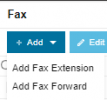
And at last, in case if you wish the fax going to the specific user extension, in the FAX settings, you can use Add Fax to the Extension option, select DID and send to your user :
1717735869863.png
 
@OlegR_3CX thank you, where is this documented I could not find via search of forums or administrative guide would have saved a lot of time.
 
Maybe not all the documentation can be found, but we are here to advise and assist you if we can.
As a partner, you can also open a ticket with us if you like, and we can advise on the questions you have, as long as they are meeting our support procedures.
 
Status
Not open for further replies.

Members Online Now

Forum statistics

Threads
111,831
Messages
589,277
Members
164,660
Latest member
RJenkinsROCK