Solved Android App doesn't display the status

Status
Not open for further replies.

GiannisA

Forum User
Advanced Certified
Joined
Dec 18, 2020
Messages
27
Reaction score
2
Hello all,

We have 2 sites with 3CX version Professional Perpetual 16.0.641 installed on windows servers.
Both 3CX servers have been assigned with public static IPs and FQDNs which are reachable from the outside.

Users in site A, when they are not connected in the internal network, they can have inbound and outbound calls from both windows app and smartphone App. Also, they get the correct status and all the contacts are available.
Users in site B, when they are outside, they can have inbound and outbound calls but they don't have correct status and their contacts are not available.

I have attached a print screen from my android (Samsung S8)

The ports that i have opened in both FirePower are the same:

TCP
5090
5060
5001

UDP
9000-9xxx RTP
5090
3478
5060


Have you seen this? Should i open any other ports ?

Thank you
 

Attachments
  • 3CX status.jpg
    3CX status.jpg
    141.5 KB · Views: 25
Last edited:
Hi there!

The fact that the users of Site B cannot see their contacts or status, sounds like the phone cannot access the HTTPS port. You say you have opened though the port 5001.

I'd start with this:
  • Is 5001 (TCP) indeed the HTTPS port you installed 3cx with (sorry, have to ask)
  • If yes, if you open a browser from the Mobile Device and point it to https://<your FQDN>:5001 , does it show you the login screen?
  • In the Management Console of site B, check the IP Blacklist.
 
Hi NickD,

I tried the above as you describe it and it shows me the login screen.
I have tried from many external networks (via 4G and wifi) and none of the public IPs are blacklisted.

I checked again the access-lists in Firepower and we have opened the same ports.

Is there anything else that i could check?

Thank you
 
When you are on Site B internal network, does the same thing happen? Or in this case do you see the extension status and contacts?
 
Yes, that's correct. When i am in the internal network i can see the status and contacts.
 
Could you create 2 new extensions on Site B, upload the config files to a file sharing service (e.g. dropbox) and send me the download links in a PM?
I would like to to check it if that's OK, then you can delete the extensions.
 
Hello NickD,

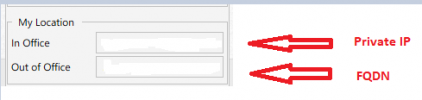
In “Phone Provisioning” tab of my extension, in “Network” section, I selected the FQDN, instead of the private IP and now is working. In Site A, we have the private IP and not the FQDN.
So it seems that the client couldn't distinct when it was in or out the internal network.
Do you know why can this happen ?
 
First of all I am glad to hear that you have found a solution!

There could be quite a few reasons, but most of them I can think of would be due to misconfiguration during the initial setup.

In the 3CX Provisioning File, under normal circumstances, it should contain 2 addresses:
- The selection of the drop-down in the Phone Provisioning tab (usually for the client to connect locally)
- The Public FQDN. This is hardcoded depending on what you have filled in during the installation

My only guess is that that Public FQDN in the file is wrong. How that happened I could not say, but it may be worth investigating and if you find this to be true, maybe find a down-time to take a full backup of the system and re-install it, to set things straight.
 
You are right about the 2 addresses in the provisioning file
Before i do the change, the settings were as below

1609836095478.png

Now, i have in both fields the public FQDN(same as before) and when i am in the internal network the FQDN is being resolved to the private IP.
 
So it works now inside and outside the network?
 
yes, it works in both cases without any issue.
 
  • Like
Reactions: NickD_3CX
Status
Not open for further replies.

Members Online Now

No members online now.

Forum statistics

Threads
111,831
Messages
589,277
Members
164,660
Latest member
RJenkinsROCK