- Joined
- Jun 16, 2016
- Messages
- 22
- Reaction score
- 0
Previously when we configured any phone or desktop app it would show up in the 3CX admin console.
If a extension was configured on the 3CX Android app / iOS app that would show in the admin console.
The issue we currently have, a number of users have the 3CX extension configured either on the Android App or iOS app but none of them show in the 3CX admin console.
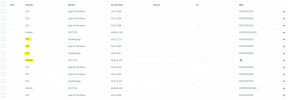
i have attached a picture of the phone area from within the 3CX admin console and highlighted the extensions in question who have the 3CX Android app configured but as advised it it not showing under phones.
If a extension was configured on the 3CX Android app / iOS app that would show in the admin console.
The issue we currently have, a number of users have the 3CX extension configured either on the Android App or iOS app but none of them show in the 3CX admin console.
i have attached a picture of the phone area from within the 3CX admin console and highlighted the extensions in question who have the 3CX Android app configured but as advised it it not showing under phones.