Android App will not receive calls

Status
Not open for further replies.

lgsbrisbane

Free User
Joined
Sep 26, 2019
Messages
13
Reaction score
2
We are running

ProductStandard Annual
Version Number16.0.676
LocationOff-site

We can receive calls on the Windows and iOS clients, but we have two users on Android and the app is not working for them

Huawei Mate 10 - app version 16.1.0.41
Galaxy S9 - app version 16.1.0

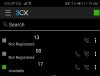
When viewing the 3CX status screen the extension for the users on Android is 'Not Registered' - this is in that user's app and in other users' apps.

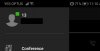
However, the user's status in their own App settings is 'Available'. The screenshots below are from the Android app for extension 13, taken within seconds of each other.

The user can make outbound calls and can call other extensions from the Android app.

Any help is appreciated.
13185

13186
 
App Ver: 16.2.0.81
Phone: Google Pixel 3

I am having the same issue. Reinstalled the app and app know shows registered. Able to make outbound calls. I am not able to receive calls.
 
  • Like
Reactions: chafor
Guys - Do you get push from other apps like whats app?
This sometimes happens.. Its an Android issue. But once it works, it will remain working.
USe 3CX inbuilt firebase account first 3cx.com/docs/configuring-google-push/
This is a link with all push problems.
https://www.3cx.com/docs/android-app-faq/#h.lcteeu5yq5kd

If you have multiple accounts, (3cx) use one for now. Only 1.
Uninstall, Clear cache, restart phone, install and qr provision
This should make it work.

If you make multiple accounts, they will work, but do not waste time posting that push is not working. You have to go through this procedure again and again and again. If you want to configure it and work without failure for ever, you need top install, provision and keep it active.
 
  • Like
Reactions: lgsbrisbane
The odd thing for me. Is it did work at one time. And just recently stopped working. I will go through the steps that you provided. Thank you!
 
  • Like
Reactions: Evolute IT
Try again - happened to me this morning on one of my most trusted phones.Once you confuse a firebase server with multiple push subscriptions coming from the same device but pointing to different servers, there is some ttl that needs to expire on their end (Google's end). uninstall, restart, go to play, and install fresh and provision. On start up all subscriptions of existing installed apps is sent. that update seems to invalid stale pushes. On start the app will not be there. nothing will be sent.install fresh after that state.
 
I set up a Firebase project, added the key to my 3cx server, uninstalled the app, cleared the cache, reinstalled the app and re-provisioned the extension. I am now receiving calls on the Huawei Mate.
 
thanks for the update - Yes a complete refresh of the setup helps.
I suggest you keep it this way and do not add multiple accounts
 
I am currently evaluating 3CX and I am facing a couple of issues.
1. 3CX android app when connected via wifi does not receive any inbound call and only a missed call is received. Once Android mobile is connected to 4G, inbound calls start working. IOS app works fine on the same Wifi. Windows client also works fine on the same Wifi.
Wifi is directly connected to 3CX server. There is no firewall in between.
I have tried to uninstall, clear cache and reinstall 3CX android app, but no success.
I have also tried different mobile handset. Still not success.

2. Under settings > Email, when trying to setup custom SMTP server, it does not work as I am trying to provide my internal MS Exchange server.
It gives following error when SSL/TLS is enabled:

"An error occurred while attempting to establish an SSL or TLS connection. The SSL certificate presented by the server is not trusted by the system for one or more of the following reasons: 1. The server is using a self-signed certificate which cannot be verified. 2. The local system is missing a Root or Intermediate certificate needed to verify the server's certificate. 3. The certificate presented by the server is expired or invalid. See https://github.com/jstedfast/MailKit/blob/master/FAQ.md#InvalidSslCertificate for possible solutions. "

I have a valid SSL certificate from Comodo on my Exchange server.

When SSL/TLS is disabled, following error is received:

"No compatible authentication mechanisms found."

Thanks in advance for any help.
 
I am currently evaluating 3CX and I am facing a couple of issues.
1. 3CX android app when connected via wifi does not receive any inbound call and only a missed call is received. Once Android mobile is connected to 4G, inbound calls start working. IOS app works fine on the same Wifi. Windows client also works fine on the same Wifi.
Wifi is directly connected to 3CX server. There is no firewall in between.
I have tried to uninstall, clear cache and reinstall 3CX android app, but no success.
I have also tried different mobile handset. Still not success.

2. Under settings > Email, when trying to setup custom SMTP server, it does not work as I am trying to provide my internal MS Exchange server.
It gives following error when SSL/TLS is enabled:

"An error occurred while attempting to establish an SSL or TLS connection. The SSL certificate presented by the server is not trusted by the system for one or more of the following reasons: 1. The server is using a self-signed certificate which cannot be verified. 2. The local system is missing a Root or Intermediate certificate needed to verify the server's certificate. 3. The certificate presented by the server is expired or invalid. See https://github.com/jstedfast/MailKit/blob/master/FAQ.md#InvalidSslCertificate for possible solutions. "

I have a valid SSL certificate from Comodo on my Exchange server.

When SSL/TLS is disabled, following error is received:

"No compatible authentication mechanisms found."

Thanks in advance for any help.

I will answer you on 1 - the other is something you have to check or post in the server forum.
But seems that comodo is not the most popular cert of authority worldwide. So you chose something wrong here. You need to choose something that has all root, and intermediate certs in all certificate stores on all devices and browsers.

So you need to contact comodo support - ask them the same question you posted here, and they will tell you what else you need to do. It is a valid question - but to the wrong people.

Wifi and Mobile Data from an android point of view is identical. There is no distinction between these 2 from an app point of view. Because you still need to go to a public server owned by google to get push. You have something in your wifi.
If it works in 4g but doesnt work inhouse, you have something inhouse. Reboot the wifi - dont know what to say. Try with the ios app. Try another android phone, Try a different wifi.. GO to a coffee shop and see if in that wifi, it works.
 
Status
Not open for further replies.

Members Online Now

Forum statistics

Threads
111,835
Messages
589,289
Members
164,668
Latest member
Infinity Network