Android phones and incoming calls issues

Status
Not open for further replies.

Christos Chatzaras

Customer
Joined
Jan 1, 2019
Messages
33
Reaction score
7
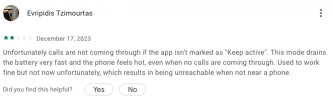
After updating our 3CX system to version 20.0, we're facing an issue. The Android phones (app version 20.0.0.32) are either not ringing at all or are ringing with a significant delay when receiving incoming calls. The problem exist only if the device screen is locked. This problem doesn't seem to affect iPhones. We've already made sure that battery optimization is turned off for these devices.
 
  • Like
Reactions: ANV-SEB
Does someone else has the same issue? I only found this recent review in Google Play Store.
 

Attachments

  • Screenshot 2023-12-28 at 12.50.25.png
    Screenshot 2023-12-28 at 12.50.25.png
    34.7 KB · Views: 58
  • Like
Reactions: Plains_JosephW
@Christos Chatzaras thanks for your feedback.

Could you please provide us the Android device brand, OS and App version?

Thanks
 
One device is:

huawei nova 5T (YAL-L21)
android 12.0.0.158 (C431E8R1P2)
3CX 20.0.0.32

I will reply again when I have the details for the second device.
 
@Christos Chatzaras Thanks.

It will also be helpful if you could provide us with verbose logging of the issue,


Provide me in Private Message the app's verbose logs in order to understand what's going on and help you out with your issue?
  1. Enable Verbose Logs: “Android App Settings (top left hamburger menu) > Settings > Advanced > Troubleshooting > Enable verbose logging”.
  2. Reproduce the issue and “Send log report”: Android App Settings (top left hamburger menu) > Settings > Advanced > Troubleshooting > Send Log Report
Thanks
 
Second device:

Xiaomi redmi note 7
Android version: 10 QKQ1.190910.002
MIUI version: Global 12.5.1 stable
3CX app version: 20.0.0.32

I asked the users to reinstall the app. If this doesn't fix the issue I will do what you wrote in your previous message.
 
Do you have an IPv6 address configured on the 3CX Server Side?
 
@Christos Chatzaras Thanks.

It will also be helpful if you could provide us with verbose logging of the issue,


Provide me in Private Message the app's verbose logs in order to understand what's going on and help you out with your issue?
  1. Enable Verbose Logs: “Android App Settings (top left hamburger menu) > Settings > Advanced > Troubleshooting > Enable verbose logging”.
  2. Reproduce the issue and “Send log report”: Android App Settings (top left hamburger menu) > Settings > Advanced > Troubleshooting > Send Log Report
Thanks

I sent you the logs.
 
Came upon this thread because I noticed the same behavior and was looking for a solution.

Samsung S22+
Android 14
3CX 20.0.0.32
No IP6
Will run the test for the logs tomorrow.
 
Came upon this thread because I noticed the same behavior and was looking for a solution.

Samsung S22+
Android 14
3CX 20.0.0.32
No IP6
Will run the test for the logs tomorrow.
I'm curious if this particular issue exists with all Android devices connected to 3CX V20. Apart from the 3 different Android devices connected to my 3CX V20, your reference and the reference in Google Playstore I have not found any other reference related to this issue.
 
@illcsales thanks for your feedback.

Could you please do the same so we can compare logs with Christos..

It will be helpful if you could provide us with verbose logging of the issue,

Provide me in Private Message the app's verbose logs in order to understand what's going on and help you out with your issue?
  1. Enable Verbose Logs: “Android App Settings (top left hamburger menu) > Settings > Advanced > Troubleshooting > Enable verbose logging”.
  2. Reproduce the issue and “Send log report”: Android App Settings (top left hamburger menu) > Settings > Advanced > Troubleshooting > Send Log Report
Thanks
 
@ThomB_3CX did not happen during my test over the last week however happened again today how long can we leave verbose on as it seems to take some time for this too occur?
 
@illcsales You can leave it on, but preferably as soon as you replicate the issue, send us the logs, otherwise it will be stripped out
 
just reporting: User on shop floor noted that Yealink IP Phone rings, then *INTERMITTENTLY* her mobile (WiFI-only) 3cx app using same extension rings after as many as 3 rings of the Yealink. She experienced a typical and expected 1-ring delay in the past. This is a noticed change since upgrade from Windows v18 to Debian v20.

I changed the forward to VM timeout from 30 sec to 50 sec, to compensate. Not a crisis here.

I must be completely honest to note that her mobile is stuck on the v16 app, and that still works, so I should be grateful for that. I need a bit more time to decide brand and purchase new rugged mobile phones (WiFI-only) for the shop.

I am merely reporting this for the possible benefit of 3CX.
 
Any idea if this issue fixed in V20 Final?
 
Yes this is fixed in final. We had another customer who reported this issue and got confirmation that was fixed.
 
  • Like
Reactions: accentlogic
Im having the exact same problem in v18.

Cellphones don't ring even with alllllll battery and APP settings to performance mode.
I have a lot of cellphones with this challenge. new Samsung, new OPPO model and Xiaomi Redmi 10.

Curiosity: it didn't happen yet with an OPPO old model and Huawei old model.

Im looking forward for a solution. Please help me.
 
Status
Not open for further replies.

Members Online Now

Forum statistics

Threads
111,831
Messages
589,277
Members
164,660
Latest member
RJenkinsROCK