- Joined
- Jul 31, 2019
- Messages
- 19
- Reaction score
- 1
Hello Everyone,
I'm currently evaluating 3CX PBX version is 16.0.2.910 on a windows server core 2019 (firewall off via NetSh Advfirewall set allprofiles state off).
In front of the 3CX I have a firewall pfsense and a provider router with a static IP.
The provider router is configured in passtrough mode DMZ to the pfsense firewall.
I followed the pfsense Guide https://www.3cx.com/docs/pfsense-firewall
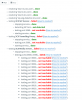
Hereafter you can find the result of the embedded firewall check.
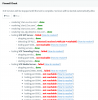
The port 5060 is open. I check from outside.

I can access to the web interface from outside via the FQDN on port 5001.
but when I use the tools "3CXWebFirewallChecker.exe" It failed.
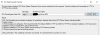
Do you have some idea? At the moment, I don't have any idea where o begin!!
Best regards,
Christian Lambricht
I'm currently evaluating 3CX PBX version is 16.0.2.910 on a windows server core 2019 (firewall off via NetSh Advfirewall set allprofiles state off).
In front of the 3CX I have a firewall pfsense and a provider router with a static IP.
The provider router is configured in passtrough mode DMZ to the pfsense firewall.
I followed the pfsense Guide https://www.3cx.com/docs/pfsense-firewall
Hereafter you can find the result of the embedded firewall check.
The port 5060 is open. I check from outside.
I can access to the web interface from outside via the FQDN on port 5001.
but when I use the tools "3CXWebFirewallChecker.exe" It failed.
Do you have some idea? At the moment, I don't have any idea where o begin!!
Best regards,
Christian Lambricht
 I will continue to read every post until the firewall check pass