Solved attended transfer not working with external calls

Status
Not open for further replies.

FrankAC

Customer
Joined
Dec 8, 2020
Messages
10
Reaction score
0
3cx app 16.6.2.89

Attended transfer with android app does only work for me when transfering an internal call. If i pick up an external call, select attended transfer and call an extension, talk to extension and then press "join" to transfer, the extension i called get's a voice prompt like "the number you have called is busy. Please try again later". Kind of, because we run the system in german language.

Any advise to bring it to work? All extensions are in one group. I also tried to set extensions to "accept multiple calls" but no change.

Thanks
Frank
 
Hey @FrankAC

Could you provide the following info so that we can get a better idea of your setup:
https://www.3cx.com/community/threads/every-new-post-must-contain.20492/

• Also, does this only affect one specific Android device? Have you tried on iOS too?
• What happens to the external caller, does he stay connected to the android user who transferred the call or does the call drop?
• Do blind transfers work?
• Does it matter what the extension the call is being transferred to is using (Webclient, iOS Client, etc) or does it happen regardless of the client used?
 
Hi Chris!
* we tried on an Iphone and it worked! So problem only with android phones (different kinds of).
* external caller is parked and can get back by first called extension by pressing the hold symbol
* blind tranfers always work
* as far as we could test it is regardless of destination device

Thanks
 
Could you confirm that these are the exact steps you are following to replicate the issue. See attachment
 

Attachments

  • 012201.gif
    012201.gif
    1.1 MB · Views: 41
Yes, exactly. Also dialing the extension number by dialpad. But dilaing with contacts or status the result is the same.
This is my screen while i am connected and talking to the extension, waiting for transfering the external caller to him.
 

Attachments

  • app_attendedtransfer.jpg
    app_attendedtransfer.jpg
    128.1 KB · Views: 21
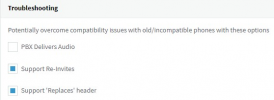
I don't know which SIP Provider you are using, but do bear in mind that a lot of them require that "Supports Re-Invites" and "Supports Replaces" is disabled and that "PBX delivers audio" is enabled. Since this is only affecting calls from external numbers it is worth checking this under SIP Trunks >> Edit >> Options >> Advanced. Note what your current settings are so you are able to revert back later if needed. Enable "PBX Delivers audio" and disable both "Supports Re-invites" and "Support Replaces", apply. Should now be as follows:
1614168761849.png

Also, go to Extensions, edit both extensions involved in the test call and go to Options, make sure the below options are set as follows:
1614168544133.png

Apply and then try again.

If this does not work either, I would highly recommend that you contact a 3CX Partner for further investigation as I am unable to replicate this in a testing environment.
 
  • Like
Reactions: grcomm and FrankAC
Hi Chris,

thank you very much! I have disabled the re-invite and replaces in trunk settings and now the attended transfer is working even for external calls. Settings in extensions were already like you suggested.

Now i just have to check for what the two disabled functions are for to be sure that i don't run into another problem.

Thanks again
Frank
 
Excellent! Glad to hear you got this resolved!

Well, whether those options are required or not depends on the provider too so, if using a 3CX Supported Provider, I would simply recommend leaving the default settings set by 3CX's template when you first create the SIP Trunk.
 
Status
Not open for further replies.

Members Online Now

No members online now.

Forum statistics

Threads
111,831
Messages
589,277
Members
164,660
Latest member
RJenkinsROCK