- Joined
- May 3, 2024
- Messages
- 4
- Reaction score
- 0
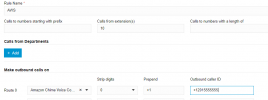
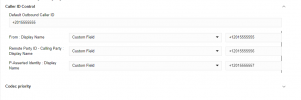
On the website Chime is listed as supporting clip no screening, is this still true? I am unable to change the outbound caller ID to any of my numbers.
The numbers are properly formatted, I've censored them but the only thing I've changed is the values.
3CX Log: Call or Registration to +11235551234@(Ln.10000@Amazon Chime Voice Connector) has failed. sip:12.34.56.78:5060;transport=TCP;lr replied: Forbidden (403)
Chime Log:
"sip_message":"SIP/2.0 403 Caller Id +10005551234 (Properly formatted number) is not valid
Via: SIP/2.0/TCP 123.45.67.89:5060;received=1.23.45.678;branch=z9hG4bK-524287-1---d2b02f20dd774b20;rport=48519
From: "+10005551234"<sip:+10005551234@chime_termination_id.voiceconnector.chime.aws;transport=TCP>;tag=e7a14355
I can't seem to find any information on clip no screening, as to what that actually means, if it's not simply using a custom caller ID.
I understand the FCC is becoming more strict on caller IDs, if AWS doesn't support this feature anymore, are there any providers that will allow me to do this without messing with the number?
The numbers are properly formatted, I've censored them but the only thing I've changed is the values.
3CX Log: Call or Registration to +11235551234@(Ln.10000@Amazon Chime Voice Connector) has failed. sip:12.34.56.78:5060;transport=TCP;lr replied: Forbidden (403)
Chime Log:
"sip_message":"SIP/2.0 403 Caller Id +10005551234 (Properly formatted number) is not valid
Via: SIP/2.0/TCP 123.45.67.89:5060;received=1.23.45.678;branch=z9hG4bK-524287-1---d2b02f20dd774b20;rport=48519
From: "+10005551234"<sip:+10005551234@chime_termination_id.voiceconnector.chime.aws;transport=TCP>;tag=e7a14355
I can't seem to find any information on clip no screening, as to what that actually means, if it's not simply using a custom caller ID.
I understand the FCC is becoming more strict on caller IDs, if AWS doesn't support this feature anymore, are there any providers that will allow me to do this without messing with the number?