Best practice On-premise or Off-premise (private) cloud installation

Status
Not open for further replies.
The base little OPNSense we use for remote offices, and some of the permanent work at home people, and small networks is ~$100, and OPNSense is hardware agnostic, so we just install it on a device that has the proper specs to handle the load expected, and it just works. In the datacenter we have one on a Dual Quad Core Xeon Dell R710, 96 GB RAM, it handles our gigabit fiber links into our internal datacenter network. We have 8 Gigabit links connected to it. It handles 10 blocks of IPs(/27s) we route to internal servers, and is setup for ~50,000,000 as a max state table size.

For Open Source solution I would rather prefer using Vyatta as a router / firewall.
 
Last edited:
I have a few installations out there with PBX delivers audio set and no port incrementing and multiple remote stun phones with no issues. Am I just getting lucky.

Indeed, this seems to be the most valid solution:

Either use SIP ALG and PBX delivers audio
OR
use STUN and PBX delivers audio.

Otherwise I get all kinds of stuff not working caused by dynamic firewall ports not being opened automatically. (ps: I'm testing with MikroTik as a firewall)

Andy.
 
Indeed, this seems to be the most valid solution:

Either use SIP ALG and PBX delivers audio
OR
use STUN and PBX delivers audio.

Otherwise I get all kinds of stuff not working caused by dynamic firewall ports not being opened automatically. (ps: I'm testing with MikroTik as a firewall)

Andy.
You need to disable SIP NAT helper in MikroTik for 3CX (for Asterisk / FreePBX it must be enabled).
If you need assistance for MT please send me a PM or email me. This site contains various useful info on MT: https://www.manitonetworks.com/mikrotik
 
  • Like
Reactions: Edi Kojsi
Sip.bg, we use mikrotik quite a bit as well. Do you have any good examples of simple queues for QoS?
 
Sip.bg, we use mikrotik quite a bit as well. Do you have any good examples of simple queues for QoS?
Probably the easiest way is to create simple queues based on addresses used by different PBX instances, if you have many, like:
Code:
/queue simple
add comment=Eagle max-limit=10M/10M name=queue10 target=172.30.10.0/24
add comment=Tenant1 max-limit=5M/5M name=queue11 target=172.30.11.0/24
add comment=Tenant2 max-limit=5M/5M name=queue12 target=172.30.12.0/24

To prioritize voip traffic in a router use something like this:
Code:
/ip firewall mangle
add action=mark-packet chain=forward dst-address=192.168.88.0/24 \
    new-packet-mark=voip_in passthrough=yes
add action=mark-packet chain=forward new-packet-mark=voip_out passthrough=yes \
    src-address=192.168.88.0/24
add action=mark-packet chain=forward disabled=yes in-interface=ether1-gateway \
    new-packet-mark=def_in passthrough=yes src-address=!192.168.88.0/24
add action=mark-packet chain=forward disabled=yes dst-address=!192.168.88.0/24 \
    new-packet-mark=def_out out-interface=ether1-gateway passthrough=yes

/queue tree
add max-limit=10M name=in parent=global
add max-limit=8M name=def-in packet-mark=def_in parent=in
add limit-at=1M max-limit=2M name=voip-in packet-mark=voip_in parent=in \
    priority=1
add max-limit=10M name=out parent=global
add max-limit=8M name=def-out packet-mark=def_out parent=out
add limit-at=1M max-limit=2M name=voip-out packet-mark=voip_out parent=out \
    priority=1
where 192.168.88.0/24 is the VoIP network, if necessary use different criteria to mangle voip traffic. The internet bandwidth is 10Mbit/s, we reserve 2Mbit/s for VoIP.

I will make a test with simple queues -- what you are asking for QoS and post it later.
 
  • Like
Reactions: Edi Kojsi
I have implemented this as a global QoS solution for a customer:
Code:
/ip firewall mangle
add action=mark-packet chain=forward connection-mark=torrent_connection \
    new-packet-mark=torrent
add action=mark-connection chain=forward new-connection-mark=\
    torrent_connection p2p=all-p2p
add action=mark-packet chain=prerouting new-packet-mark=tunnel protocol=\
    ipsec-esp
add action=mark-routing chain=prerouting new-routing-mark=ipsec packet-mark=\
    tunnel
add action=mark-packet chain=prerouting dst-address-list=pbx new-packet-mark=\
    voice
add action=mark-packet chain=postrouting dst-address-list=pbx \
    new-packet-mark=voice
add action=mark-packet chain=prerouting new-packet-mark=voice \
    src-address-list=pbx
add action=mark-packet chain=postrouting new-packet-mark=voice \
    src-address-list=pbx
add action=mark-routing chain=prerouting new-routing-mark=voip packet-mark=\
    voice
add action=mark-packet chain=prerouting dst-address=192.168.88.0/24 \
    new-packet-mark=other
add action=mark-packet chain=postrouting dst-address=192.168.88.0/24 \
    new-packet-mark=other
add action=mark-packet chain=prerouting new-packet-mark=other src-address=\
    192.168.88.0/24
add action=mark-packet chain=postrouting disabled=yes new-packet-mark=other \
    src-address=192.168.88.0/24
add action=mark-packet chain=prerouting new-packet-mark=voice protocol=gre
add action=mark-packet chain=postrouting new-packet-mark=voice protocol=gre
add action=mark-packet chain=prerouting comment="ICMP Traffic" \
    new-packet-mark=icmp passthrough=no protocol=icmp
add action=mark-packet chain=prerouting comment="VOIP DSCP 26 SIP" dscp=26 \
    new-packet-mark=voice_sip passthrough=no
add action=mark-packet chain=prerouting comment="VOIP DSCP 46 RTP" dscp=46 \
    new-packet-mark=voice_rtp passthrough=no
add action=mark-connection chain=prerouting comment=DNS_connection \
    new-connection-mark=dns_conn port=53 protocol=udp
add action=mark-packet chain=forward new-packet-mark=upload_traffic \
    passthrough=no src-address-list=Business_Clients
add action=mark-packet chain=prerouting comment="DNS Traffic" \
    connection-mark=dns_conn new-packet-mark=dns passthrough=no
add action=mark-connection chain=prerouting comment=Winbox_Connection \
    new-connection-mark=winbox port=8291 protocol=tcp
add action=mark-packet chain=prerouting comment=Winbox connection-mark=winbox \
    new-packet-mark=winbox passthrough=no
add action=mark-connection chain=prerouting comment=Remote_Connection \
    new-connection-mark=remote port=22,3389,8291 protocol=tcp
add action=mark-packet chain=prerouting comment=Remote_Packets \
    connection-mark=remote new-packet-mark=remote passthrough=no
add action=mark-connection chain=prerouting comment=\
    "HTTP Download Large files" connection-bytes=1000000-1000000000 \
    new-connection-mark=http_large_download port=80 protocol=tcp
add action=mark-packet chain=prerouting connection-mark=http_large_download \
    new-packet-mark=http_large_traffic passthrough=no
add action=mark-connection chain=prerouting comment=HTTPS_Connection \
    new-connection-mark=https port=443 protocol=tcp
add action=mark-packet chain=prerouting comment="HTTPS Traffic" \
    connection-mark=https new-packet-mark=https passthrough=no
add action=mark-connection chain=prerouting comment=HTTP_Connection \
    new-connection-mark=http port=80 protocol=tcp
add action=mark-packet chain=prerouting comment="HTTP Traffic" \
    connection-mark=http new-packet-mark=http passthrough=no
add action=mark-connection chain=prerouting comment=P2P_Connections \
    new-connection-mark=p2p_conn p2p=all-p2p
add action=mark-packet chain=prerouting comment=P2P_Traffic connection-mark=\
    p2p_conn new-packet-mark=p2p_traffic passthrough=no

/queue tree
add name=ICMP packet-mark=icmp parent=global priority=1 queue=default
add name=VOIP_RTP packet-mark=voice_rtp parent=global priority=2 queue=\
    default
add name=DNS packet-mark=dns parent=global priority=3 queue=default
add name=VOIP_SIP packet-mark=voice_sip parent=global priority=3 queue=\
    default
add name=WINBOX packet-mark=winbox parent=global priority=4 queue=default
add name=REMOTE packet-mark=remote parent=global priority=5 queue=default
add name=HTTS packet-mark=https parent=global priority=6 queue=default
add name=HTTP packet-mark=http parent=global priority=6 queue=default
add name=HTTP_DOWNLOAD packet-mark=http_large_traffic parent=global priority=\
    7 queue=default
add name=OTHER packet-mark=other parent=global priority=7 queue=default
add name=NO_MARK packet-mark=no-mark parent=global priority=7 queue=default
add burst-limit=128k burst-threshold=128k burst-time=10s limit-at=64k \
    max-limit=64k name=P2P packet-mark=p2p_traffic parent=global queue=\
    default
 
  • Like
Reactions: Edi Kojsi
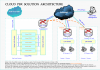
This is the architecture for own cloud using Layer 2 and Layer 3 tunnels (based on MikroTik routers or equivalent).
onesmart cloud pbx architecture.png
 
Status
Not open for further replies.

Latest Posts

Forum statistics

Threads
111,880
Messages
589,533
Members
164,735
Latest member
998742