Solved Bitrix24 self hosted. Can I use self signed certs?

Status
Not open for further replies.

greychain

Gold Partner
Advanced Certified
Joined
Jul 13, 2018
Messages
779
Reaction score
122
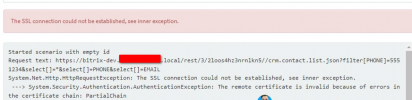
I have a customer using self signed certs for his self hosted Bitrix24 installation. When I click on test I get a SSL error

1712656006826.png

Which root CA do I add to which server?
 
I think the error provides the answer "The remote certificate is invalid because of errors in the certificate chain". Yeah, that's the problem with a self-signed certificate.

In the era of free SSL certificates from Let's Encrypt and others, help your customer convert to a "real" certificate. We use "Certify the Web" for automating the creation and renewal of certs on Windows, and Certbot on Linux. It's easy to do, free, and it eliminates the issues with self-signed certificates.

There is one potential gotcha however... you must have a valid resolvable FQDN you can assign to the Bitrix server (at least for the required ports) that Let's Encrypt can use to verify your ownership of the FQDN (needed to obtain a certificate). It is not hard to accomplish the verification if you have basic knowledge on how to open ports on the firewall. Once the verification is complete, you can close the verification port (TCP 80) and never worry about this again.
 
I have a customer using self signed certs for his self hosted Bitrix24 installation. When I click on test I get a SSL error

View attachment 40745

Which root CA do I add to which server?
You need to add the issuer (and any intermediates, but unlikely) to the Root CA store. And if you have an intermediate cert, it must be present in the chain on the bitrix server.
There is one potential gotcha however... you must have a valid resolvable FQDN you can assign to the Bitrix server (at least for the required ports) that Let's Encrypt can use to verify your ownership of the FQDN (needed to obtain a certificate). It is not hard to accomplish the verification if you have basic knowledge on how to open ports on the firewall. Once the verification is complete, you can close the verification port (TCP 80) and never worry about this again.
They could do DNS validation without worrying about this.
 
They could do DNS validation without worrying about this.
Absolutely true. I always debate which is easier, updating the DNS or briefly opening port 80. I usually go with port 80 since I rarely have access to the customer's DNS server.
 
You may also consider using a 3CX FQDN to avoid this situation.
 
The solution used in the end was to add the cert from the Bitrix machine to the 3CX root CA directory
I think the error provides the answer "The remote certificate is invalid because of errors in the certificate chain". Yeah, that's the problem with a self-signed certificate.

In the era of free SSL certificates from Let's Encrypt and others, help your customer convert to a "real" certificate. We use "Certify the Web" for automating the creation and renewal of certs on Windows, and Certbot on Linux. It's easy to do, free, and it eliminates the issues with self-signed certificates.

There is one potential gotcha however... you must have a valid resolvable FQDN you can assign to the Bitrix server (at least for the required ports) that Let's Encrypt can use to verify your ownership of the FQDN (needed to obtain a certificate). It is not hard to accomplish the verification if you have basic knowledge on how to open ports on the firewall. Once the verification is complete, you can close the verification port (TCP 80) and never worry about this again.
Yes it would be nice if they used real FQDN but no, they want to use .local
 
  • Like
Reactions: TheodorosG_3CX
Glad to know the issue is resolved. ;)
 
Status
Not open for further replies.