Call audio drops after 15 minutes, ended calls stay open (2)

Status
Not open for further replies.

ZorgNed - JDooge

Free User
Joined
Jul 11, 2019
Messages
33
Reaction score
5
This is a continuation of https://www.3cx.com/community/threads/call-audio-drops-after-15-minutes-ended-calls-stay-open.68404/ ; except that topic is closed.

I've been keeping an eye on the activity log, and I see the following odd things:
11/21/2019 11:48:21 AM - [CM503003]: Call(C:35): Call to <sip:[email protected]:0> has failed; Cause: 487 Request Terminated/INVITE from 192.168.91.131:5060
11/21/2019 11:48:21 AM - [CM503003]: Call(C:35): Call to <sip:[email protected]:0> has failed; Cause: 487 Request Terminated/INVITE from 192.168.91.135:50148
11/21/2019 11:30:36 AM - [CM503003]: Call(C:33): Call to <sip:[email protected]:0> has failed; Cause: 487 Request Terminated/INVITE from 192.168.91.131:5060
11/21/2019 11:30:36 AM - [CM503003]: Call(C:33): Call to <sip:[email protected]:0> has failed; Cause: 487 Request Terminated/INVITE from 192.168.91.135:50148
11/21/2019 10:54:40 AM - [CM503003]: Call(C:31): Call to <sip:[email protected]:0> has failed; Cause: 487 Request Terminated/INVITE from 192.168.91.131:5060
11/21/2019 10:54:40 AM - [CM503003]: Call(C:31): Call to <sip:[email protected]:0> has failed; Cause: 487 Request Terminated/INVITE from 192.168.91.135:50148

These are this mornings failed calls. The IP adresses refer to:
.131: A co-worker's phone (GrandStream GXP2100)
.135: The same co-worker's 3CX client on their desktop

Oddly enough, this co-worker was not handling these calls, however they originally arrived at her phone via the ring group (prioritized hunt) and were taken by using *20*90 (90 is the ring group virtual extension number)!!

After all the searching for issues in our WAN, it turns out this might be an internal issue! But how do I get to solving this?
Its as if 3CX doesn't know the call transferred, however we use 3CX to transfer it.
 
Last edited:
Recreate the issue with Wireshark running: https://www.3cx.com/docs/capture-network-traffic/

Ensure that PBX delivers audio has been enabled on the extension so you can get both legs of the call and then see what happens in the capture.

If this was the first time this was reported I would have to say firewall issue, in fact I had a similar issue with firewall recently and it was to do with the IP being sent to the provider being wrong.
 
@eddv123 My original thought was a firewall issue as well, but the 3CX PBX is in the same (flat) LAN as the phones in this case. I'm capturing a test call now.
 
So this issue occurs between 2 handsets on the same LAN ?

If this is the case confirm the following also, are they:

  • On the same IP subnet range.
  • In the same VLAN.
  • Located within (from) the same infrastructure/switch).
 
So this issue occurs between 2 handsets on the same LAN ?

If this is the case confirm the following also, are they:

  • On the same IP subnet range.
  • In the same VLAN.
  • Located within (from) the same infrastructure/switch).
Ah no; only with external calls. So it sure can be an issue on that side.
Is there a way to "anonymize" the logging data?

What I've seen in my dump so far:
  • RTP traffic between my 3CX client and the 3CX PBX (both ways dest/source)
  • RTP traffic between the 3CX PBX and the trunk provider (external IP, both ways dest/source)
Both these last for the full duration of the call (~15 mins)
- Occasional SIP traffic (Status: 200 OK) between my client and the PBX

Then at some point (~15 minutes into the call):
  • The RTP traffic from the trunk provider towards the PBX stops, PBX continues to send RTP traffic to the trunk provider
  • No other messages captured at this point, it just stops receiving audio (which is audible with the usual phone noise disappearing in my headset) but the call stays active
  • I manually end the call on my 3CX client (it doesn't auto-disconnect, however for the other (external) side the connection just drops) which results in a Request: BYE sip:etc..

This would indeed indicate a problem with the external connection and/or firewall. I'll investigate more, much thanks already!

Edit:
After my phone (3CX client) sends the BYE, the PBX 'forwards' this to the trunk provider (at that point the call is already gone). This gets confirmed by the trunk providers reply:
324259 895.893110 (trunk provider ip) (pbx ip) SIP 565 Status: 481 Call leg/transaction does not exist |
 
Last edited:
3CX client

Web client, Windows client ? Windows and MAC clients use 3CX tunnel which makes it difficult to trace.

The RTP traffic from the trunk provider towards the PBX stops, PBX continues to send RTP traffic to the trunk provider

Similar sort of issue as what I had, have you contacted the provider to ask ?

Who is the provider and what is the firewall brand you are using ?
 
Web client, Windows client ? Windows and MAC clients use 3CX tunnel which makes it difficult to trace.
Windows 3CX Client; the same happens when using our phones but those might be easier to capture then. I can retry with one of those later today.

Similar sort of issue as what I had, have you contacted the provider to ask ?
Yes, sadly I did not get much response. They were not aware of any SIP timers (refresh/update) or things that could possibly fail on their end.

Who is the provider and what is the firewall brand you are using ?
Provider is Signet: https://www.3cx.com/docs/signet-dutch-sip-trunk/

Firewall is a SonicWall TZ300 running SonicOS Enhanced 6.5.1.2-52n.
The SIP Transformations option is disabled.

Thanks for all the input so far!
 
So to confirm, on-premise 3CX with SonicWall at the edge - SonicWalls have been a real issue for myself (and others in the past) however personally I have bypassed these issues by setting up the on-premise phones to a cloud 3CX via VPN tunnel (completely traverses the firewall and removes issues).

This page may assist: http://help.sonicwall.com/help/sw/eng/7020/26/2/3/content/VoIP_voIPOptions.htm
Worth checking over the firewall however you should be asking the provider if they know why the audio is no longer being sent - if they are a good provider they will have the ability to trace this issue at their end also.

Perhaps even going a step further if your Wireshark skills are any good and tracing an call which is working and one which is not.
 
  • Like
Reactions: ZorgNed - JDooge
This looks a NAT issue to me.
I had a similar issue with some clients with really aggressive firewalls, where the NAT translation for UDP were set too low or not set at all.
Changing this value to 180 seconds could solve the issue (depending on firewall brand, model, FW, ...)

Usually providers send an INFO-Message after 10 or 15 minutes to the caller on the same IP:port where the device registered before initiating the call. If the firewall is too aggressive in dropping UDP connections, then the INFO is received on a different port and the INFO-Message is not answered, so the call is dropped.
 
  • Like
Reactions: ZorgNed - JDooge
This looks a NAT issue to me.
I had a similar issue with some clients with really aggressive firewalls, where the NAT translation for UDP were set too low or not set at all.
Changing this value to 180 seconds could solve the issue (depending on firewall brand, model, FW, ...)

Usually providers send an INFO-Message after 10 or 15 minutes to the caller on the same IP:port where the device registered before initiating the call. If the firewall is too aggressive in dropping UDP connections, then the INFO is received on a different port and the INFO-Message is not answered, so the call is dropped.
Hmm are you talking about the UDP Flood Protection setting? This is currently set to 30 seconds and I get a strong warning to not change it.
 
Hmm are you talking about the UDP Flood Protection setting?
Hard to say as I don’t know your firewall. I should need to read the firewall manual...
But I would suggest to give it a shot :)
 
  • Like
Reactions: ZorgNed - JDooge
Hard to say as I don’t know your firewall. I should need to read the firewall manual...
But I would suggest to give it a shot :)
I think I found some ominous settings; at least its the first time I encounter the 15 minute timer somewhere:
5n4D13B.png


Thanks. UDP was set to 30s, I set it to 180. Lets see what happens. Alternatively I can perhaps upgrade the TCP timer.
 
  • Like
Reactions: Zol
Sadly neither of these settings had any effect. Suggestions welcome :)
 
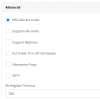
is your trunk set like that?
13238
 
Wanted to know if supports Re-invite was unticked, because i've got similar problems with calls dropped due to this setting ticked on trunk side
 
  • Like
Reactions: ZorgNed - JDooge
Wanted to know if supports Re-invite was unticked, because i've got similar problems with calls dropped due to this setting ticked on trunk side
Ah yes; my settings are exactly the same as in your screenshot, it is currently unticked.
 
After much testing/capturing at various points (at the trunk providers side, on the firewall and in our PBX) I can indeed confirm that the firewall remaps the UDP port and promptly forgets about this, receiving packets from the trunk provider that never reach the PBX.

Now to figure out how and where to configure this... Perhaps I need to set the timeouts to 20 minutes to test at first.
 
  • Like
Reactions: Zol
Newsflash: As a sort of last resort I've forced the trunk SIP control traffic over TCP (transport protocol TCP instead of ANY in trunk options -> advanced) and this "solved" the problem.

It still feels like a nasty workaround but at least it works for now. Thanks everyone! :)
 
  • Like
Reactions: AWS2P and Zol
Status
Not open for further replies.

Forum statistics

Threads
111,934
Messages
589,819
Members
164,811
Latest member
aurorasigntrtechitnet