


- Joined
- Jul 12, 2021
- Messages
- 5
- Reaction score
- 2
Hello!
I have been attempting to configure Microsoft Teams Direct Connect to connect 3CX to our Microsoft Teams environment. I've reviewed the online guides and several forum posts multiple times and have the configuration that matches my understanding of requirements. However, I am unable to make calls between the systems.
When calling from Teams to 3CX (or externally via 3CX), I am getting 499 "Caller is Forbidden" errors and "603 Decline" statuses. I have attached a sample from a verbose Activity Log call.
When calling from 3CX to Teams, I am unable to see any incoming calls to the Teams extension.
Users do show mapped to Teams in the 3CX portal.

Phone numbers are entered in the Company field in Teams in E.164 format with extension (ie, +14055551234;ext=100).
I am currently self-hosting 3CX v20 U6 in Microsoft Azure's cloud service.
Any ideas/suggestions would be much appreciated.
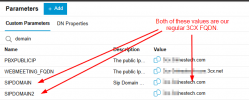
I have been attempting to configure Microsoft Teams Direct Connect to connect 3CX to our Microsoft Teams environment. I've reviewed the online guides and several forum posts multiple times and have the configuration that matches my understanding of requirements. However, I am unable to make calls between the systems.
When calling from Teams to 3CX (or externally via 3CX), I am getting 499 "Caller is Forbidden" errors and "603 Decline" statuses. I have attached a sample from a verbose Activity Log call.
When calling from 3CX to Teams, I am unable to see any incoming calls to the Teams extension.
Users do show mapped to Teams in the 3CX portal.
Phone numbers are entered in the Company field in Teams in E.164 format with extension (ie, +14055551234;ext=100).
I am currently self-hosting 3CX v20 U6 in Microsoft Azure's cloud service.
Any ideas/suggestions would be much appreciated.


