Calls no longer display queue name after v20 update

Status
Not open for further replies.

COMSMA

Customer
Basic Certified
Joined
Oct 27, 2020
Messages
5
Reaction score
0
We have the setting in the phone book enabled "Add Group, Queue or DID/DDI Names to Caller ID" to show users which queue is ringing. After the v20 update it only shows the DID of the number that called us. Does v20 properly support this feature?
 
There has been no change in this behavior. Are you using 3Cx Client or ip phones?
Is there difference with Append or Prepend option?
 
I have tried preped and append. I wanted to say it’s because we’re using a different trunk template because we switched to Twilio but it happened with the flowroute template as well. The day we upgraded to v20. We use the web client and iOS app, we don’t have ip phones.
 
The calls are routed directly to the Queue?
Has the template been modified?
 
The template has not been modified and it happens for both the ring group and call queue
 
The calls are routed directly to the Queue or RG?
 
The inbound call are routed directly to the queue or RG?
How is the inbound rule configured?
 
Are you using unsupported SIP with a support SIP trunk template?

you might be better of using unsupported SIP trunk from the "Add gateway" button and review the settings under caller ID control
 
This is not a problem of an unsupported trunk or template. This display has always only shown the text which has entered the name in the incoming rule.
So, a problem that the V20 has, because you can no longer do this.
At the moment I would use the V20 with caution, as there are still problems that have not been solved. There are many small problems but in total you need a lot of creative ideas to solve them as a technician.
Currently I would use the V18 until the V20 achieves the same quality. If the V20 is a must, first set up the V18 and set up the configuration completely and then migrate to V20 and set up the additional configurations such as the departments.
 
  • Like
Reactions: John-SM
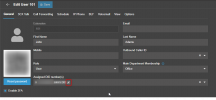
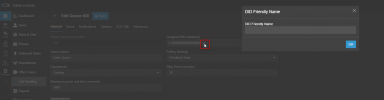
Just ensure in Version 20 that you do have a name assigned to the DID. Use the little pencil icon next to the DID when it is assigned.

1717065762985.png
 
Many thanks Nicholas for the solution.
 
  • Like
Reactions: NicholasP_3CX
Just ensure in Version 20 that you do have a name assigned to the DID. Use the little pencil icon next to the DID when it is assigned.

View attachment 41696
How would you do this with call groups?
My users have no DIDs assigned directly to them, only do a call hunt via groups but need to list the group name in the incoming ID so they know what to answer the calls as
 
How would you do this with call groups?
My users have no DIDs assigned directly to them, only do a call hunt via groups but need to list the group name in the incoming ID so they know what to answer the calls as
This would be the exact same procedure, just assign the DID to the Ring Group or Queue, and rename it via the little pencil icon

1718624359915.png
 
Hi, I also have this issue, and tried the rename pencil. However still does not display queue name. I did update to the latest beta today. Could this be why?
 
This shouldn't be the case and also cannot replicate.
Can you open a support ticket to check further?
 
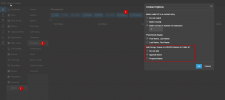
To see that information, enable the ability to see the group, queue or DID names

1718778908991.png
 
Status
Not open for further replies.

Latest Posts

Members Online Now

No members online now.

Forum statistics

Threads
111,831
Messages
589,276
Members
164,660
Latest member
RJenkinsROCK