Solved Can the time format be changed to a 12 hour clock

Status
Not open for further replies.

pbomboy

Free User
Joined
Aug 17, 2021
Messages
64
Reaction score
7
The time format 12/24 can be set on a desktop phones, there a way to change this on the app?
 
Mine is showing 12 hour. Does it not use the Windows setting? Where in the app are you seeing 24h?
 
This is the android forum. I am referring to the android app. Recent call, voicemail, etc.
 
Oh my bad, disregard then. To much clicking around.
 
@pbomboy
SteveITS may have gotten the platform wrong but the solution should be the same.;)

If you change the system time format of the android device itself it should also affect what you see in the 3CX Android App.
 
@pbomboy
SteveITS may have gotten the platform wrong but the solution should be the same.;)

If you change the system time format of the android device itself it should also affect what you see in the 3CX Android App.
No the android platform is set to 12 hour time, but the 3cx app displays in 24 hour time.
 
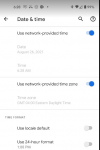
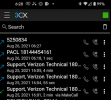
Note time is set to 12 hour format, it 6:28 am. I just placed a call an it displays as 24 hour format 06:27.


1629973958987.png
1629973910119.png
Android 11, Updated Aug 5, 2021
Build RQ3A.210805.001.A1
 
Did you completely exit the app and re-launch after the changes were made?

Also, what exact brand/model are you using?
 
Yes, but with your recommendation I tried restarting the phone, and now it works. I should have thought of that. Thanks for your insight! I use 24 hour time, but my users hate it.
 
  • Like
Reactions: ChrisC_3CX
Excellent! Glad to see you managed to resolve the issue!


Please feel free to start a new thread should you need anything else.
 
Status
Not open for further replies.

Members Online Now

Forum statistics

Threads
111,831
Messages
589,277
Members
164,660
Latest member
RJenkinsROCK