Cannot get Caller ID for Outbound Calls to Work

Status
Not open for further replies.

artooro

Customer
Joined
Jan 19, 2023
Messages
26
Reaction score
8
In Zendesk all of our contacts have phone numbers stored in the E.164 format.
So I created reformat rules that simply take 10 digit phone numbers and prepend them with +1.

It's working fine for inbound calls, but for outbound the phone numbers remain in the 10 digit format.
I have tried assigning various outbound parameters to "OriginatorCallerID" but that hasn't made a difference.
Also I've fully disabled "E164 Processing Settings" in settings.

Any tips on why outbound calls are not getting reformatted?
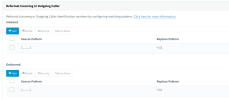
Screenshot 2023-01-19 at 12.16.19.png
 
Does your SIP Trunk require that you send outbound numbers with 10 digits instead of using E164 format?

Are you having problems with contact lookup for outbound calls only?
 
Does your SIP Trunk require that you send outbound numbers with 10 digits instead of using E164 format?

Are you having problems with contact lookup for outbound calls only?
No the SIP trunk works fine with E164 numbers. And since I disabled "E164 Processing Settings" if I dial out this way it links to the Zendesk contact just fine.
But I want users to be able to type in the 10-digit number and dial that way as well and still link to the correct contact.
 
I understand. The problem is that the reformatting happens when the call is being sent to the SIP Trunk, but the contact lookup is triggered just before, when the call arrives to the "external line" in 3CX. Then, the contact lookup against Zendesk is triggered with the number dialed by the user. Unfortunately this is a known limitation for outbound calls, the reformatting will not help, the only way I can imagine would be editing the template to add the "+1" and configure 3CX to send always 10 digits (in the 3CX Console > Advanced > Contacts > Options).
 
I understand. The problem is that the reformatting happens when the call is being sent to the SIP Trunk, but the contact lookup is triggered just before, when the call arrives to the "external line" in 3CX. Then, the contact lookup against Zendesk is triggered with the number dialed by the user. Unfortunately this is a known limitation for outbound calls, the reformatting will not help, the only way I can imagine would be editing the template to add the "+1" and configure 3CX to send always 10 digits (in the 3CX Console > Advanced > Contacts > Options).
Hmm ok. I thought about editing the template, in fact I already did edit it to use token authentication instead of password.
But we'll also need to support international numbers, I've just started with US/Canada numbers.
I see that the XML template uses a .Replace function, not sure if that could be chained somehow to make this work. Is there documentation somewhere of what can all be done in this template code?
 
Here you have the detailed documentation of the XML for CRM templates:
https://www.3cx.com/docs/server-side-crm-template-xml-description/

The Replace method is something you can use. Actually, any C# method on a string can be used. You can use the IIf function to check if the number starts with "+" and in that case leave it as it is, otherwise you add the "+1".
 
  • Like
Reactions: Evolute IT
It appears that you can't chain IIf functions together? For example I want to leave numbers that start with + alone, just add the URL encoding. Then if a number starts with 1, just add a +. And otherwise add +1.

XML:
<Request Url="https://[Domain].zendesk.com/api/v2/users/search.json?query=role:end-user%20phone:[IIf([Number].StartsWith(&quot;+&quot;),[Number].Replace(&quot;+&quot;,&quot;%2B&quot;),IIf([Number].StartsWith(&quot;1&quot;),&quot;%2B&quot;+[Number],&quot;%2B1&quot;+[Number]))]" MessagePasses="0" RequestEncoding="UrlEncoded" RequestType="Get" ResponseType="Json">

Man it would be nice to have a function in the template to take care of all the sanitization including international.
For example if 3CX would make https://www.nuget.org/packages/libphonenumber-csharp available for use in the templates that might be pretty useful.
 
Last edited:
It appears that you can't chain IIf functions together?
Yes, just use brackets to indicate that you're using a function. This is probably what you need:
[IIf([Number].StartsWith(&quot;+&quot;),[Number].Replace(&quot;+&quot;,&quot;%2B&quot;),[IIf([Number].StartsWith(&quot;1&quot;),&quot;%2B[Number]&quot;,&quot;%2B1[Number]&quot;)])]
 
  • Like
Reactions: Evolute IT
I was having a problem with getting the numbers formatted correctly with a particular SIP provider, the provider sending the number with the country code 0049, I tried reformatting but in the end ended up with 2 matching scenarios for the same number.

https://[Domain].weclapp.com/webapp/api/v1/contact?phone-eq=[[Number].Replace("0049","%2B49")]
https://[Domain].weclapp.com/webapp/api/v1/contact?phone-eq=[[Number].Replace("+","%2B")]

hope this helps
 
  • Like
Reactions: edossantos
Status
Not open for further replies.