Solved Cannot log in as a user or admin with Office365

Status
Not open for further replies.

GeorgeTs

Bronze Partner
Advanced Certified
Joined
Jan 28, 2021
Messages
30
Reaction score
10
Hello,
We have been trying to integrate our 3cx v18 Enteprise Edition with Office365, so that - as a first step - users and admin can log in to the 3cx console or webclient with their Microsoft account.
What happens is that, in the log in screen, we click the "Sign in with Microsoft" button, get redirected to Microsoft, then provide our credentials and then we are redirected back to the 3cx log in screen.

Any idea what we may be missing?

Thank you in advance,
George
 
Hi @George Ts,

Do you have an on prem exchange server and if yes, is one of the users that has this happen to them, one of the ones that is syncing to Microsoft Azure?

Would you mind generating the support info from the Management Console, PM me the files and also in that PM, let me know the email address that the user is using?
 
Hi @VasilisV_3CX
We do not have an on premise exchange.
I have sent you the Support logs in PM.
Please note that trying to hit the "Sign in with Microsoft" button, does nothing while using Chrome (perhaps a cookies issue?)
I can reproduce the behavior in the description only after opening a Private Session with Firefox.
Thank you,
George
 
Hi @GeorgeTs,

What happens is that, in the log in screen, we click the "Sign in with Microsoft" button, get redirected to Microsoft, then provide our credentials and then we are redirected back to the 3cx log in screen.
To clarify, when you click Sign in with Microsoft, nothing happens now? Or does the above still stand?

Thank you, I've downloaded them.
 
Hi @VasilisV_3CX
The behavior is different with Chrome and Firefox:
With Chrome, it does nothing, we are not even redirected to Microsoft.
With Firefox, we get the behavior reported in the description of this topic (we are redirected to Microsoft and after we provide the credentials, we are redirected back to the 3cx log in screen)
 
  • Like
Reactions: VasilisV_3CX
Thanks for clarifying, will revert back to you soonest.
 
Hi @GeorgeTs,

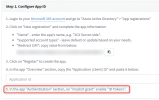
Can you double check that you've made sure that step 5 has been actioned?

1630999374806.png
 
Last edited:
  • Like
Reactions: brendangooden
Hi @VasilisV_3CX
Confirmed, step 5 has been followed.
We just applied it for another 3cx, and got the exact same results.
 
For others reading this, when @GeorgeTs followed the following advice, he was able to log in using the Sign in with Microsoft button.
  1. Disable MS365 User sync and Sign In
  2. Delete the Extension
  3. Recreate the extension manually and put the email address that the user has in MS365
  4. Re-enable User Sync and Sign In and the information of the users should populate the newly created extension
  5. Try logging into the WebClient again.
 
Status
Not open for further replies.