Configuring a FortiGate 40 Firewall

Status
Not open for further replies.

KaterinaK_3CX

Joined
Feb 24, 2016
Messages
246
Reaction score
36
I'm really excited to see a configuration for a modern Fortigate firewall. We've been having problems with our Fortigate failing the 3CX Firewall test (detecting SIP ALG) for years. Things still worked, but always failed the test, now we are trying to move to a new SIP provider and need to fix this issue.

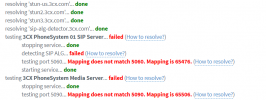
On the example 3CX Outbound rule, you have "Preserve Source Port" disabled. When I disable this, a number of things fail, where as before only my SIP ALG failed.

1689815983636.png

Any thoughts on this?
 
  • Like
Reactions: Alejandro_3CX
Hello @advlaser to let you know what are the messages you are getting.

SIP ALG Failed means that the pbx was not able to contact the sip alg detector server or didn't receive the response from that server; when you run the firewall checker you can see that the pbx sends a request to the domain sip-alg-detector.3cx.com, so you must allow this traffic.

Regarding the message Mapping does not match, it means there is not port preservation. When the pbx is testing for example the sip port 5060, then the outbound traffic is changing that port to another one, in your tes it was changed to 65476, so if the pbx sends the request as 5060 then the same port must be used when the packet is leaving the local network, also fyi many ISP change these ports when you are not using a corporate internet service, so in case you have all your settings ok you have to check also with your ISP. One last thing, no source port remapping should be used.

You can also check this document where is explained why the firewall checker does not lie.

For further assistance with the fortigate firewall you must enter in contact with them.

Have a great day!
 
  • Like
Reactions: jed and N_G
Can you say who your internet provider is? We have an AT&T IP Flex circuit and they block SIP traffic unless specifically requested not to (in writing).
 
  • Like
Reactions: jed
That sounds like that may be the problem. We have AT&T dedicated fiber. Support with AT&T is extremely painful. Currently our SIP trunks are with AT&T, but moving to a new providor. Before the move, we are setting up a test line. So do we need to tell AT&T to disable SIP ALG? If we do that, will it break our existing SIP trunking with AT&T?
 
Yup, we are in the exact same situation. AT&T will only terminate SIP trunks on premise at their router site. If you want to move to the cloud, you have to request for the SIP ports on their firewall to be unblocked (port 5060 I believe). It is a bit messy and we're in the process right now.

Have you thought about using an SBC (Session Border Controller)? Greatly simplifies the firewall setup. Another great reason to use the cloud.
 
Last edited:
  • Like
Reactions: advlaser and jed
@bdoviack - you are correct regarding AT&T blocking all non AT&T SIP traffic. I had to sign the following document to open up 5060. Hopefully they do it soon.

The inbound access control list on the AT&T-managed router for AT&T IP Flexible Reach on AT&T Dedicated Internet (ADI) is configured to allow for SIP (User Datagram Protocol or 'UDP' 5060) traffic originating only from the AT&T Global MPLS Network infrastructure. This inbound access control list configuration prevents unauthorized voice traffic from reaching the PBX/Session Border Controller ("SBC"). AT&T advises Customer that without this inbound access control list configuration, the PBX/SBC is vulnerable to Internet-originated unauthorized access and fraudulent activity.

A Customer’s written request to AT&T to open User Datagram Protocol (UDP) ports, i.e. 5060, 5061, 5062, Transmission Control Protocol (TCP) ports, i.e. 5060, 5061, 5062, and User Datagram Protocol Real-Time Transport (RTP) ports, i.e. 5000-10000 on the ADI Customer Edge Router to allow SIP signaling and media handoff to Customer’s hosted VOIP provider is a Non-Standard UDP/TCP/RTP solution. Any action to implement a Non-Standard UDP/TCP/RTP Solution is subject to the following: (1) AT&T disclaims all liability for all costs, damages, claims, or conditions that in any manner arise from or relate to a Non-Standard UDP/TCP/RTP Solution, including without limitation, any resulting costs, damages, claims, or conditions from any service interruption, unauthorized access, fraudulent calls, or other security/fraud incident; and (2) Customer is advised to work with its vendor to secure the PBX/SBC in advance.
 
Thanks for the article.

Regarding split DNS configuration: The Fortigate DHCP server settings for the interface you're using for split DNS must have the 'DNS server' set to 'Same as interface IP'.

This sets the interface IP address (LAN IP like 192.168.1.1) as the DNS server address for DHCP clients, rather than having a public DNS IP address. The public DNS IP address did not work for us but the LAN DNS IP worked fine, and this was recommended by a Fortigate tech.
 
Status
Not open for further replies.

Forum statistics

Threads
111,974
Messages
590,081
Members
164,899
Latest member
mazet