Configuring a pfSense Firewall

Status
Not open for further replies.

KaterinaK_3CX

Joined
Feb 24, 2016
Messages
246
Reaction score
36
This document describes the configuration of pfSense v2.4.4+ for use with 3CX. This basic guide is written for PBX administrators on networks with a single WAN IP, or who are using their primary WAN IP for 3CX.

Read the guide.
 
I haven't tested with the older version 2.4.4(released back in 2019), but on the current versions 2.5.x CE and pfSense Plus 21.x, I've tested quite thoroughly and the following statements about 1:1 NAT are incorrect.

Code:
1-to-1 NAT

    1-to-1 NAT on pfSense for 3CX does not work properly. You need to use the instructions above.
    Any 1-to-1 entries for 3CX IPs or ports will result in improper operation.

If configured properly with firewall rules, one can in fact use 1:1 NAT for their 3CX PBX without issue. Just make sure to use a dedicated public IP address for your 3CX server and then setup the required inbound and outbound firewall rules for SIP trunks, Webclient, and Bridge connections detailed here.

For reference:
Here are the current releases for pfSense: https://docs.netgate.com/pfsense/en/latest/releases/versions.html
And here is the supporting pfSense documentation for proper NAT setup: https://docs.netgate.com/pfsense/en/latest/recipes/nat-voip-pbx.html#configuring-nat-for-a-voip-pbx
 
uhm, i wouldnt expose the admin portal on an internal ip to the public unless intentional and yes you can get the ssl host.3cx.tld to function / resolve / use cert as expected via below method on LAN.

Much easier, if you use your pfsense ip as the dhcp dns, is to skip and just do a 'Services / DNS Resolver' and under 'Host Overrides' add your host 'example' then the domain '3cx.tld' with your internal ip. WINRAR! Of course 'example.3cx.tld' is what yours is actually set up as here.

FWIW, i only allow 5060 and 9000:10999 firewall rules and with the source as my sip provider subnet. *simples*

I use AdGuard as my default DHCP DNS, which falls back onto my pfsense DNS, which in turn does the dns overrides check before it hits the cloudflare dns.
 
Last edited:
  • Like
Reactions: Patch1
uhm, i wouldnt expose the admin portal on an internal ip to the public unless intentional and yes you can get the ssl host.3cx.tld to function / resolve / use cert as expected via below method on LAN.

Much easier, if you use your pfsense ip as the dhcp dns, is to skip and just do a 'Services / DNS Resolver' and under 'Host Overrides' add your host 'example' then the domain '3cx.tld' with your internal ip. WINRAR! Of course 'example.3cx.tld' is what yours is actually set up as here.

FWIW, i only allow 5060 and 9000:10999 firewall rules and with the source as my sip provider subnet. *simples*

I use AdGuard as my default DHCP DNS, which falls back onto my pfsense DNS, which in turn does the dns overrides check before it hits the cloudflare dns.
Interesting setup.
How do your internal users when external to your controlled network, not using a remote VPN connection, connect to your 3CX server using the Webclient if you are not passing 443 traffic to your 3cx endpoint?
 
you could port forward the respective remote ports? Of course with this set up they wouldnt be able to access the 5001 as thats lan only.

doesnt suit all i guess, but i have no external users, and if i want to access the admin website i'll vpn in via wireguard.
 
you could port forward the respective remote ports? Of course with this set up they wouldnt be able to access the 5001 as thats lan only.

doesnt suit all i guess, but i have no external users, and if i want to access the admin website i'll vpn in via wireguard.
Sure one could VPN via a number a methods not just wireguard, but again the only way for your users to securely access the /webclient path without being VPNed in is to allow that secure traffic to pass to the internal 3CX server from the public Internet. There are several other items you can put into play to help with security on this traffic. On the pfSense side you can and should use ACLs, IDS/IPS, pfBlockerNG, etc, and on the 3CX side there are a number of security options you can and should implement/configure. In addition one could add yet another layer with a WAF in-between the firewall and 3CX server.
But as you've alluded to it all depends on your user's needs, and then implementing the services and proper protection of those services to meet those needs.
 
yeah we all have different motives and methods, im just a firm believer of not exposing what isnt necessary to all and sundry. Defeats the purpose of using something like pfsense.
 
  • Like
Reactions: Patch1
yeah we all have different motives and methods, im just a firm believer of not exposing what isnt necessary to all and sundry. Defeats the purpose of using something like pfsense.
"Not exposing what isn't necessary." - That's a good belief to stand by.
Your statement about it defeating the purpose of using something like pfSense, if meant in general, is completely incorrect. You may feel in your case with your environment that using 1:1 NAT is unnecessary, and that sounds valid given what you've provided about your environment. And yes, if you don't know what you're doing, or are new to pfSense or NAT in general, then you can overexpose a service without properly applied firewall rules. But by no means is using 1:1 NAT less secure than your suggestion of port forwarding. Further more, my initial post wasn't regarding its security value, but rather that their guide is incorrect and one can in fact use 1:1 NAT with the current supported version of pfSense and pfSense Plus.
Now if your clients will only ever connect to your 3CX server from within your LAN, then great, lock it all down sans necessary ports to/from your SIP provider. And I would strongly suggest anyone else with that design to do the same which meets the whole "not exposing what isn't necessary" mentality. But in many cases it is necessary to allow your remote users, using their mobile devices, the means to securely access 3CX for calls and video conferences. And this can be done in a secure manner using pfSense with knowledge and understanding of 3CX ports used for its services. More details on that here.
 
im just a firm believer of not exposing what isnt necessary to all and sundry. Defeats the purpose of using something like pfsense.
Agree
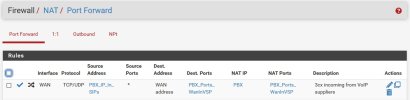
I define an Alias for each of
  • IP addresses of my VoIP suppliers (actually alias of an aliases for each individual VoIP supplier to simplify maintenance). Domain names are entered into the aliases where available.
  • Ports for each port forward group
The result port forward then only forwards white listed addresses.

Port forward.jpg
 
Status
Not open for further replies.

Forum statistics

Threads
111,974
Messages
590,083
Members
164,899
Latest member
mazet