Connection error to Hubspot

Status
Not open for further replies.

hernanp

SOHO User
Basic Certified
Joined
Jun 17, 2021
Messages
43
Reaction score
2
I'm having an issue connecting 3CX to Hubspot. I've read all posts in the forums and checked the instructions multiple times, and cannot make it work.

Your help will be very appreciated

Screenshots:
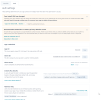

1685558154739.png


OxvoCgnDMJ.png


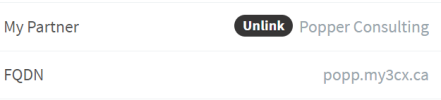
This is the URL I use at 3Cx:

1685558184766.png


It does not have the :5001, but I tried with it in Hubspot too without success.
When I try accessing 3CX with the :5001, it errors.


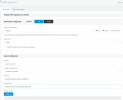
This is the result I always get:

1685558254390.png

I am using the instance with the data, not the developer one.

I tried everything.

Any ideas?

Thanks!
 

Attachments

  • 1685558113123.png
    1685558113123.png
    132.3 KB · Views: 4
  • 1685558123265.png
    1685558123265.png
    132.3 KB · Views: 4
  • 1685558139917.png
    1685558139917.png
    132.3 KB · Views: 4
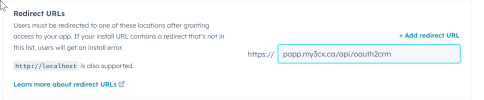
In your Hubspot app configuration, change the Redirect URL from:
https://popp.my3cx.ca/#/api/oauth2crm

to:
https://popp.my3cx.ca/api/oauth2crm
 
  • Like
Reactions: Evolute IT
Thanks, I tried that too.

1685564008176.png

still same error
 
Last edited:
If you're getting the same error, then you're accessing your management console in a different URL.
 

Attachments

  • 1685567205930.png
    1685567205930.png
    11.7 KB · Views: 5
When you click the "Authorize" button, a new browser tab will be launched. The URL in this tab will contain the redirect URL being specified by 3CX. You need to compare that with what you have configured in your Hubspot app.
 
That's weird, that's the escaped URL. In my case it works with the human readable version....
 
wow, this is weird. I did that, and it worked when I used this:
https%3A%2F%2Fpopp.my3cx.ca%2Fapi%2Foauth2crm

I don't understand why that works and replacing all those %F with the correct signs did not, but I'm not going to complain...


https://app.hubspot.com/oauth/authorize?response_type=code&client_id=8ada80c8-deae-41b2-bc5d-c1cac23f4c57&redirect_uri=https://popp.my3cx.ca/api/oauth2crm&state=7ded64dd-41b2-4805-a2a9-f01601c1b0b5&scope=crm.objects.contacts.read crm.objects.contacts.write crm.objects.companies.read crm.objects.owners.read timeline
What browser are you using?

@edossantos probably something with UTF8 URLs in his browser.
 
Chrome. I did try with Edge and had the same issue.
 
It connected, but some calls are not being logged. It's inconsistent, 1 every 3 or 4 would not show up in Hubspot.

How can I troubleshoot it?
 
I will close this one and start a new post, as the issue is different now.
 
Status
Not open for further replies.

Members Online Now

No members online now.

Forum statistics

Threads
111,831
Messages
589,277
Members
164,660
Latest member
RJenkinsROCK