Solved Contacts on Yealink Phone vs Web Client

Status
Not open for further replies.

amir_

Premier Customer
Joined
Aug 7, 2020
Messages
185
Reaction score
46
We are rolling out Yealink phones and I have a complaint that the contact lists being built on Yealink Phones are not sync'ed to the user's contact list she is building in her Web Client.

Are these separate contact lists?

TIA,

Amir
 
Make sure the user is looking in to the "3CX Phonebook" on the Yealink.

Note that the phones autoprovision once a day so changes she makes from the web client are no instantly updated to the phone. If she wants it to push ASAP then she needs to power cycle the phone so it can autoprovision again.
 
  • Like
Reactions: ChrisC_3CX
@amir_

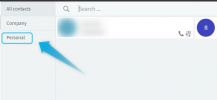
If the user is creating contacts in the Personal contact list then yes, these are separate contact lists and they will not appear on the IP Phones. Make sure the user is not entering them here:
1620637156216.png
Instead, ask them to create contacts in the Company phonebook right above.

Regarding provisioning, what @kieferschild says is true but do also note that most Yealink IP Phones allow you to manually force a Phonebook update without having to reprovision. You can do this from the device itself, just press "3CX Phonebook" and then "Update" from the device's onscreen menu.

Also bear in mind that IP Phones only use the three following contact fields: First Name, Last Name, Mobile Phone number, so make sure they are populated for all contacts in the "3CX Management Console >> Advanced >> Contacts section".
 
Last edited:
Status
Not open for further replies.

Members Online Now

No members online now.

Forum statistics

Threads
111,831
Messages
589,277
Members
164,660
Latest member
RJenkinsROCK