Custom1name not showing in extension config

Status
Not open for further replies.

MichaelRS

Forum User
Joined
Aug 31, 2018
Messages
5
Reaction score
0
Hello!

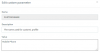
We changed the variables for Custom1Name and Custom2Name a while ago. They sow up correctly in the 3cx client software, but in the PBX client configuration the respective fields are empty (see screenshot). Am I missing something or are there any naming conventions we have to heed?

TIA + merry christmas!
upload_2018-12-24_11-48-28.png
 
Hello @MichaelRS

How did you change the Status names? Did you do it from the client or the PBX? Also what PBX version are you running? You can see the exact build number on the Dashboard, under the Information column next to the licence version. For example 15.5.15502.6.
 
Hi Yiannis!

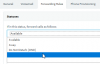
We changed it directly in the PBX via Settings - Parameters:

upload_2018-12-27_10-51-57.png

Our current version is 15.5.1694.0.

TIA for any advice on this...
 
The first thing you need to do is to update to the latest PBX version to avoid any activation issues as older versions of the PBX are no longer able to authenticate against the activation server due to a certificate change. You can use the following guide to help you update:
https://www.3cx.com/blog/news/pbx-upgrade-update-6/

You should not make changes to the system from the custom parameters of the PBX as you can cause instability issues. You should change the names under Settings / PBX.
 
Thanks for the reminder to update. Will do in the next days.

As for the custom parameters: I tried changing the custom names via Settings - PBX, but that did not help, either. Weird thing is, those two custom names show up just fine in the clients' GUIs.

It's not an error per se, we just kept forgetting configuring those options since these lines are empty on the admin interface.
 
I would recommend setting the parameters back to the default value and then update the system to the latest stable version. See if you can replicate the issue there so we can further troubleshoot.
 
Will try that. Thanks for the advice!
 
Status
Not open for further replies.

Forum statistics

Threads
112,091
Messages
590,705
Members
165,064
Latest member
husky58