DIAL PLAN 3CX

Edwin--

Bronze Partner
Basic Certified
Joined
Oct 12, 2023
Messages
2
Reaction score
0
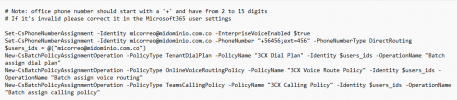
I'm having trouble with the SIP format for calls to complete:When I synchronize the contact in TEAMS I have +56456 in the 3CX script I see that the (PhoneNumber "+56456;ext=456) is generated,That is, the OFFICE PHONE field should be with +56456 or +56456;ext=456?Now if I put +56456;ext=456 in the field and generate the 3CX script, it now generates +56456456;ext=456, that is, it doubles the extension.
The OFFICE PHONE information and the TO information that tries to contact 3CX are the same but the call fails.


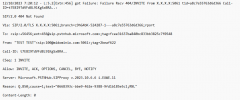
3CX call trace to Teams
1697116255074.png
1697116437627.png
 

Attachments

  • 1697115870056.jpeg
    1697115870056.jpeg
    8.9 KB · Views: 0
The generated user script will reformat the number placed within the Office phone section of the 365 user and the outbound caller ID of the user's extension to the format seen in the user script. The number you must add to the User 365 office phone number must be in the format +56456, only, but it should be the number that you want the called party to see and be able to call back to.

When this is run the map user script, it will provision the team's app dial pad and use the number in the format presented as +xxxxxxxx ext. xxx.

For example, for an extension number of 102

1697117497297.png


See this guide for troubleshooting:https://www.3cx.com/docs/microsoft-teams-integration-faqs/
 
That is to say, the user in his OFFICE PHONE sees +56456 but in Teams a routing +56456;ext=456 is created?

Any command for Teams to apply the changes?
 
This is correct.

Enter the caller id under the users extension, as per my previous reply,, generate the user script and run within power shell, as per guide, to provision the user within teams.
 

Members Online Now

No members online now.

Forum statistics

Threads
111,831
Messages
589,277
Members
164,660
Latest member
RJenkinsROCK