Display Name not showing-Wavix

Status
Not open for further replies.

Amna

Free User
Joined
May 29, 2023
Messages
7
Reaction score
1
I am using Wavix with 3cx, when calling from 3cx it doesn't display name and caller ID on called number, it just says "anonyms".
Can you advise what should be done?
 
Regarding your question, does the caller ID come through from Wavix? Or is the caller ID being presented to 3CX as anonymous?

Additionally, are you using 3CX SMB or 3CX Free or Dedicated instance? And have you just posted this in the wrong section for the forum?
 
Yes the caller ID come through from Wavix.I am using 3cx enterprise version and sorry not sure what you mean by wrong section of the forum.
 
How did you check that the numbers passed from Wavix, please? And what is used to answer calls that do not show the caller ID?
 
So I read on the forum to switch to verbose logging and see what information is being sent from 3cx when we make a call. I don't see caller id and name in that activity log.
To answer calls I am using my other number that is also on 3cx but it's a different system.
 
Hi @Amna please note that regarding outbound caller id you have can use the following methods:
  1. Globally, edit the SIP Trunk ---- caller id --- configure a global caller id, in this way any user using this sip trunk for outbound calls, the global caller id will be present.
  2. Specific by each user, you can edit the user extension --- general tab ---- outbound caller id. So if this user makes an outbound call via this trunk the specific caller id will be used.
  3. Specific caller id per Outbound Rule, you can create the outbound rule and set a caller id, this will take priority for outbound calls matching this rule.
Now that you know how is handled the caller id, then the Outbound Parameters will take an important role when sending the INVITE to your voip provider.

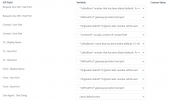
Wavix by default uses the following outbound parameters, you should be using the default template

1699319523821.png


Once done, if you set the pbx logs to verbose, then you can use the activity log and filter the outbound call, in this way you can know which outbound rule is being used and the invite sent to the voip provider.

I hope this helps yourself troubleshoot the outbound caller id sent by the pbx.

Take care!
 
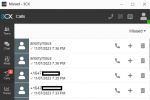
Hi @Alejandro_3CX, I used Wavix default template as per your above comment and it showed me original caller number and not the outbound caller ID that is being set in user extension because i assume this is what from display and user part is set to. Then i added a caller ID in SIP trunk and it showed anonymous (picture is attached), i removed caller ID from SIP and refreshed SIP registration but still it is showing anonymous.
Also, the display name, how can I get outbound calls to display the user name that is set in extension?
 

Attachments

  • Caller ID.png
    Caller ID.png
    14.4 KB · Views: 6
Status
Not open for further replies.

Members Online Now

Forum statistics

Threads
111,831
Messages
589,277
Members
164,660
Latest member
RJenkinsROCK