Distinctive ringtones on a Yealink T54W

Status
Not open for further replies.

David_K

Bronze Partner
Basic Certified
Joined
Apr 3, 2019
Messages
198
Reaction score
27
Hello

A customers wants that if internal extension 116 is calling, the ring tone should be different on her T54W.

I don't know how to set this up.
They have the 3CX Pro version, so no Queues I believe.
I've defined a Ring Group, but seems to be no options to differ the ringtone.

Is this possible? If yes how? Phone templates?
I'm not a "phone template expert" and anyway each time 3CX releases a new phone template we push it, so I suppose it'll delete our custom templates if we do one.
I'm not even sure we can modify phone templates on a 3CX Pro version?

As a basic workaround, I could at least make all internal calls different ringtone from external calls.
If this is easy to configure it would be a good first step.

Thanks for your help
 
In regards to ringtones, what you can do through 3CX is:

1. Change the device's Internal Ringtones. This can be done from within "Extensions >> Edit >> Phone Provisioning >> Configure Default Ring tone" option.

2. Have a different ring tone per Call Queue(Available in Pro also). For this you would first have to enable the "Use Custom Ringtones per queue..." under "Settings >> Phone / App Options". Once you do that, you'll see an option to configure the ringtones for queues under the Extension's Phone provisioning tab.

I do not know if what you ask for is possible via the IP Phone's UI directly, but if it is, you would indeed have to use custom templates. Do note that custom templates do not get overwritten by our default templates.
 
Thanks @ChrisC_3CX

I was looking for the Queue option and did not have it...
It was because we did not apply the Pro license.
After applying, I have now the Queue option and created a Queue.
Will ask customer if OK with distinctive ring tone now.

Thanks :)
 
Glad to hear!

Do let us know if there's anything else we can help with!
 
Yes, just a little doubt : if I make an extension member of a queue, it'll be by default always logged in to the queue?
I need that because users will ALWAYS forget to log in the queue otherwise.
 
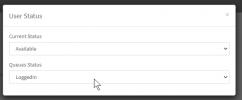
If the extension is globally logged out of Call Queues at the time you add it to a Queue, it will not automatically be logged in now. You can toggle extension global login/logout status from the Management Console though so you could log the extension in once you've added it to the Call Queue. Just go to Extensions >> Edit >> Status to do this.
 
You mean this? Does "Queues Status" mean that this extension is connected to ALL the queues it's member of?

1626275124288.png
 
You mean this?
Yes.

Does "Queues Status" mean that this extension is connected to ALL the queues it's member of?
Not exactly, this controls the Global Login status. An extension may be a member of multiple Queues and can log in logout of individual Queues meaning the user can be logged in to some and logged out of others at the same time. Logging in and out of individual Queues is called explicit loging/logout. Global login/logout on the other hand will log a user out of all Queues but their explicit login/logout status is saved so that, when the user globally log back in, they will automatically be only logged in to the Queues they were previously explicitly logged back in.

With the above in mind, when you add a new member to a Queue, they will be explicitly logged into that Queue by default. So all you will need to make sure is that they are also globally logged in to receive calls.
 
  • Like
Reactions: Evolute IT
OK thanks
I hope the user won't click to log out from the Queue, since she is the only member...
Can I receive an alert if no one is connected to a queue ?
 
Can I receive an alert if no one is connected to a queue ?
Not if noone is connected but you can receive an email if a queue call is lost which is what would happen if no agents were logged in at the time the call was received.

These email notifications can be sent to the Queue manager. You can set queue managers for Queues by editing the Queue and then going to "Notifications". There you can also select what kind of notifications you want the Queue Managers to receive regarding this Queue.
 
  • Like
Reactions: Evolute IT
Status
Not open for further replies.

Members Online Now

No members online now.

Forum statistics

Threads
111,831
Messages
589,277
Members
164,660
Latest member
RJenkinsROCK