Double NAT Network - How to configure

Status
Not open for further replies.

JCubio

Free User
Joined
Oct 7, 2019
Messages
134
Reaction score
13
Hi Guys,

We're new to 3CX and we wan't to test the system.
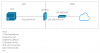
I'm trying to install now the On-Premise instance but the problem is our network. We're behind a double NAT network.*please see attached screenshot of our network overview.

Has anyone have this issue before? How do I approach this current roadblock

Thanks in advance for your advises.
 

Attachments

  • 3cx issue.png
    3cx issue.png
    20.5 KB · Views: 39
We have done this, using third party isp routers (I.e. virgin modems in the UK)

Check the isp router to see if it has a dmz option , change the settings to point to the pfsense ip address. this should forward all ports on the wan IP address to the pfsense firewall

Lan side of isp router should be on the same ip address as the pfsense wan port

You should be able to setup your pfsense as normal 3cx setup
 
Last edited:
We have done this, using third party isp routers (I.e. virgin modems in the UK)

Check the isp router to see if it has a dmz option , change the settings to point to the pfsense ip address. this should forward all ports on the wan IP address to the pfsense firewall

Lan side of isp router should be on the same ip address as the pfsense wan port

You should be able to setup your pfsense as normal 3cx setup
Hi Sir,
By pfsense IP, you mean the wan interface of pfsense?
 
Yes, pfsense wan IP address.

the pfsense wan ip has to be in the same network range as the isp modem lan network , and the gateway of the pfsense wan port is the isp lan ip address.

if you find the dmz settings on the isp modem, you enter the pfsense wan ip address
 
isnt it possible to bridge isp modem to have directly public ip adress on wan port of pfsense and no more than one nat
 
isnt it possible to bridge isp modem

Exactly what I was going to say, a modems only job should be to offer a point to terminate the ISP's connection so you can (if possible) bridge through to your firewall (turn off any features such as NAT, DHCP, ACL's etc on the modem) and have the firewall terminate the connection using the ISP's provided username and password.

Double-NAT can be a real pain and should be avoided if possible in my view.
 
isnt it possible to bridge isp modem to have directly public ip adress on wan port of pfsense and no more than one nat
Yes sir. This option is in my list. I just need to coordinate with our ISP which I can't do as the moment since I'm in night shift.
 
Status
Not open for further replies.

Forum statistics

Threads
111,934
Messages
589,818
Members
164,810
Latest member
astrobalaji