Error while setting up Teams Integration (Teams Direct Routing)

Harpau

Customer
Joined
Jan 15, 2021
Messages
10
Reaction score
1
I want to set up the new Teams Direct Routing and after restarting I get these error messages in the activity log:

Exception creating Teams transport: port already in use
Failed to create Teams transport
TLS transport for Teams is not available. Teams integration is disabled

Could this be because the "SIP port used by PBX" is set to 5062 in the network settings?
Or is there another reason for this?

Thanks a lot!
Harald
 
Hi Harald,

This could certainly be a reason, yes.
If you have installed on Linux, if you login via SSH and run the following command, what is the output?
Bash:
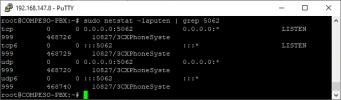
sudo netstat -laputen | grep 5062

This should tell you if there is something listening on port 5062.
 
Hi Nick,

many thanks for your reply.
The output looks like this:

2021-08-18 (1).png
 
Did you by any chance install 3CX and choose the SIP Port to be 5062 instead of the default 5060?

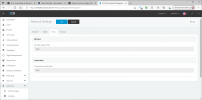
In the Management Console --> Settings --> Network, in the "Ports" tab, what ports are allocated?
 
Yes, I used port 5062 during installation instead of the default value 5060. The reason was that with AVM Fritz!Box routers, using port 5060 causes problems. This is probably also the reason why your tutorial for setting up the firewall of an AVM Fritz!Box also uses port 5062 and not 5060 (https://www.3cx.com/docs/avm-fritzbox-firewall-configuration/)! I have oriented myself to this.

2021-08-18 (2).png
 
Yes, I used port 5062 during installation instead of the default value 5060. The reason was that with AVM Fritz!Box routers, using port 5060 causes problems. This is probably also the reason why your tutorial for setting up the firewall of an AVM Fritz!Box also uses port 5062 and not 5060 (https://www.3cx.com/docs/avm-fritzbox-firewall-configuration/)! I have oriented myself to this:

View attachment 23735
The tutorial for the Fritz!Box was written quite some time ago before the Teams Integration was introduced, but I understand what happened.
The only solution I am afraid is to re-install 3CX and use a different SIP Port, e.g. 6060.

The port the Teams Integration uses cannot be changed, it is hard-coded to 5062.
 
Ok, thank you very much, I understand. Of course, that is very inconvenient.
Is it then possible to restore a backup of my current configuration after the reinstallation or can I then again not change the port configuration?
 
And, please, one more question: the main reason I want to test Teams integration is that in 3CX, my users would like to automatically set their status to red/busy when they make calls in Teams and vice versa. Does it even work this way?
 
Is it then possible to restore a backup of my current configuration after the reinstallation or can I then again not change the port configuration?
Yes, you can take a backup of your system as it is now, download the backup, uninstall 3CX, re-install and restore the backup and you will get asked to choose new ports.
All your config will be restored then, note though that you might have to at least reboot all your IP Phones so they reprovision (new SIP Port...).


the main reason I want to test Teams integration is that in 3CX, my users would like to automatically set their status to red/busy when they make calls in Teams and vice versa. Does it even work this way?
After you have set it up, if you use Teams to dial a number through 3CX, then other extension will see the Teams Extension as "Busy" in the Presence.

If you use Teams though to call another Teams user, without going via 3CX, then no, in 3CX presence the Teams extension will show as Green/Available.
 
Hi Nick,

Thank you very much for your detailed reply.
Unfortunately, it is the synchronisation of the status between teams and 3CX that my staff urgently want. It is simply very annoying when a call comes in via 3CX while you are in a Teams meeting. However, this problem still does not seem to have been solved by the new Teams integration. Or is there another solution (apart from Calendar Sync)?
 
Hi Nick,

Thank you very much for your detailed reply.
Unfortunately, it is the synchronisation of the status between teams and 3CX that my staff urgently want. It is simply very annoying when a call comes in via 3CX while you are in a Teams meeting. However, this problem still does not seem to have been solved by the new Teams integration. Or is there another solution (apart from Calendar Sync)?
Not really. There's no API in Microsoft to change the status. They simply have to put themselves in DND when they go on a Teams-only meeting/call.
 
Not really. There's no API in Microsoft to change the status. They simply have to put themselves in DND when they go on a Teams-only meeting/call.

That is exactly what they are doing at the moment (if they don't forget). Is there an API in 3CX to query/change the status?
 
That is exactly what they are doing at the moment (if they don't forget). Is there an API in 3CX to query/change the status?
Not as of yet. However, it could be part of the upcoming REST API that is currently in development. No ETA.
 
Ok, thank you for that info. Then I hope we don't have to wait too long for it, because that would help us a lot.
 
Here's just an idea, if the Teams meetings are planned ones, and the participants have the meeting in their O365 Calendar, then you could enable the Calendar Sync which will change the status of the 3CX Extension for the duration of the calendar event.

This though won't help much with impromptu meetings that may be done.
 

Members Online Now

No members online now.

Forum statistics

Threads
111,831
Messages
589,277
Members
164,660
Latest member
RJenkinsROCK