Gamma SIP Trunk Configuration Guide | UK

Status
Not open for further replies.

KaterinaK_3CX

Joined
Feb 24, 2016
Messages
246
Reaction score
36
Read our guide on how to configure a SIP Trunk / VoIP Provider. This covers the generic steps required to configure a trunk with 3CX. Take note of the below special configuration requirements for Gamma:

  • Enter the main trunk number in the national format (e.g. 07975777666).
  • Gamma Trunks support Clip No Screening as long they are CLI Flex trunks, which means you can present the originator caller ID for forwarded calls.
  • For calls directly from the PBX to Gamma, the outbound caller ID presented must belong to your trunk. This is to ensure that emergency calls always present the correct caller ID to emergency services.
 
Hi,

I have tried your guide but on the hosted Gamma doesn't appear under UK, I have looked for the generic sip provider and that doesn't appear either.

I am using the 3CX Hosted Platform

Am I missing something?
 
Last edited:
Hi,

I have tried your guide but on the hosted Gamma doesn't appear under UK, I have looked for the generic sip provider and that doesn't appear either.

I am using the 3CX Hosted Platform

Am I missing something?
If Gamma doesn't offer Register-based trunks, then it won't be supported on "Hosted by 3CX". They don't support IP-based trunks.
 
Last edited by a moderator:
  • Like
Reactions: NickD_3CX
3CX hosted now does list Gamma under UK, but the setup doc for Gamma is asking for an IP address, obviously I can ping our company.3cx.uk and get an IP address but I assume this isn't guaranteed to be static?
 
3CX hosted now does list Gamma under UK, but the setup doc for Gamma is asking for an IP address, obviously I can ping our company.3cx.uk and get an IP address but I assume this isn't guaranteed to be static?
If you're referring to the Registrar IP address, then there you need to put the IP Gamma is providing you with.
Note though that if you're referring to the IP in the "Options" tab in 3CX in the "Put Public IP in SIP VIA Header", yes, this needs to be the Public IP of your 3CX Hosted instance.

If your IP changes for whatever reason, in which case you should be notified by email, then you need to update this value as well.

Some goes for if you are referring to the IP of the 3CX system Gamma is requesting from you to set in their systems. If your 3CX Public IP changes, you need to update Gamma as well.

If you check the * note next to the "Not Recommended" value at the end of the page, we explain why it isn't recommended, and the above is the summary of why.
 
Thanks Nick, I believe Gamma are initially asking me for the IP address of my 3CX PBX, so in my case with hosted, this is the IP of the Digitalocean server where my Hosted instance is sitting, I assume I'm correct in that when I ping my companyname.3cx.uk that's the IP they're after?

I had a look for " if you're referring to the IP in the "Options" tab in 3CX in the "Put Public IP in SIP VIA Header", yes, this needs to be the Public IP of your 3CX Hosted instance." but I couldn't track it down, is that within the Options of a SIP trunk once I've created it?

Would all Owner & Administrator accounts on the Portal be sent the same email notification that the IP on Hosted had changed? I believe I'll have a portal with Gamma where I should be able to log on right away and change the IP address,

Yea I read the note and did query it with our comms provider who use Gamma for all their SIP trunks, they said they have thousands of 3CX customers on various systems with no issues, but I wonder if those are self hosted/hosted with them/hosted in cloud providers that guarantee a static IP or something?

That leads to my follow up question about digitalocean offering static IP as an option, I guess unless there is some type of outage the IP wouldn't change?

Thanks,
 
Thanks Nick, I believe Gamma are initially asking me for the IP address of my 3CX PBX, so in my case with hosted, this is the IP of the Digitalocean server where my Hosted instance is sitting, I assume I'm correct in that when I ping my companyname.3cx.uk that's the IP they're after?
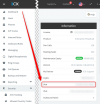
Yes, that is correct, doing ping companyname.3cx.uk[I][/I] or even better nslookup companyname.3cx.uk 8.8.8.8 will give you the public IP of your 3CX. You can also find your 3CX Public IP right from the 3CX Dashboard:
1644504003601.png


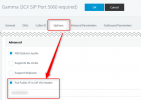
I had a look for " if you're referring to the IP in the "Options" tab in 3CX in the "Put Public IP in SIP VIA Header", yes, this needs to be the Public IP of your 3CX Hosted instance." but I couldn't track it down, is that within the Options of a SIP trunk once I've created it?
1644504062082.png


Would all Owner & Administrator accounts on the Portal be sent the same email notification that the IP on Hosted had changed? I believe I'll have a portal with Gamma where I should be able to log on right away and change the IP address,
Both the Admin Email Address and the Owner Email address will get notified that the IP has changed if the 3CX is "Hosted by 3CX".


Yea I read the note and did query it with our comms provider who use Gamma for all their SIP trunks, they said they have thousands of 3CX customers on various systems with no issues, but I wonder if those are self hosted/hosted with them/hosted in cloud providers that guarantee a static IP or something?
Those could very well be self-hosted, but for self-hosted our recommendation is to have a Static Public IP, so most self-hosted will probably be like this.


That leads to my follow up question about digitalocean offering static IP as an option, I guess unless there is some type of outage the IP wouldn't change?
That is right, and to be precise it is rarer than that. If DO has an outage, usually when everything comes back online the IP is the same. The rare occasions where the IP *may* change is if e.g. your instance/droplet becomes completely unresponsive and needs to be re-created from a backup, or if in the unlikely event that DO closes down a Data Center and we need to migrate all VMs/Droplets to another DC. As you can understand, it's pretty rare, but within the realm of possibilities, so we have to mention it so the users are aware.


I hope this answers your questions
 
it does and is very reassuring Nick, also a little embarrassing that the IP is there on the dashboard, to be honest I'd just not full engaged with the details on the dashboard while I was learning about a myriad other new things going through the various help documentation and tutotials :)
 
  • Like
Reactions: NickD_3CX
Status
Not open for further replies.

Members Online Now

Forum statistics

Threads
111,831
Messages
589,277
Members
164,660
Latest member
RJenkinsROCK