Help Provisioning Snom Phones

Status
Not open for further replies.

dpenny

Customer
Basic Certified
Joined
May 7, 2021
Messages
14
Reaction score
2
Hi all, I'm just getting started with 3CX and am having trouble getting my Snom phones to auto-provision. We use a different voice VLAN for each data closet, so I've got phones spread across about 9 different VLANs. I'm using option 66 on our DHCP server to inject the IP address of the 3CX server and the phones look like they are getting the correct information. However, it doesn't look like any information is being returned to the phone after it contacts the 3CX server. Do I have to manually add all of the MAC addresses to 3CX first?

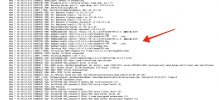
I have attached an image from the phone log showing that it received the correct values and is trying to talk with the 3CX server. I've followed the steps of manually updating the firmware and doing a factory reset on the phone. I'm expecting the phone to show up in the "Phones" list on the 3CX server for me to assign to an extension, but it never shows up. Any help would be greatly appreciated.

Sincerely,
Doug
 

Attachments

  • snom-d785-log.png
    snom-d785-log.png
    603 KB · Views: 39
Hi @dpenny !

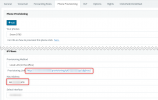
Yes, that is correct. You need to first create/add the snom devices, with the correct MAC Addresses in the 3CX Management Console, in the Extension Settings of each Extension. Something like this:
1620399384770.png

Then you give option 66 that is highlighted.

What happens in the background is that the phones each ask for the Provisioning File with their MAC Address. 3CX Generates those files based on the MAC Address you have used in the MC, that's why you need to put it in 3CX first.
 
Thanks, that makes sense and is sort-of what I figured. I got it working with a different Snom Phone by doing just that, but based on this documentation, https://www.3cx.com/sip-phones/snom-710-720-760/, it sounded like the phone should just appear in the phones list without first being added.
 
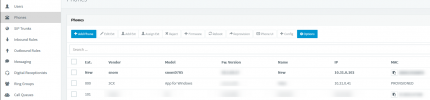
It does appear, if you don't use Option 66. This is of course assuming that phones and PBX are on the same LAN/Subnet, because for the phone to appear, it sends a multicast packet that when received by the PBX, makes it show like this:
1620400199616.png


Then you can manually allocate a phone to an extension.

You though obviously don't want to do that as you are going with Option 66.
 
It does appear, if you don't use Option 66. This is of course assuming that phones and PBX are on the same LAN/Subnet, because for the phone to appear, it sends a multicast packet that when received by the PBX, makes it show like this:
View attachment 21934


Then you can manually allocate a phone to an extension.

You though obviously don't want to do that as you are going with Option 66.

Thanks for clearing that up.
 
  • Like
Reactions: NickD_3CX
Status
Not open for further replies.

Members Online Now

Forum statistics

Threads
111,832
Messages
589,280
Members
164,662
Latest member
DejanMDS