How To: Ad-Hoc Audio Conferencing in 15.5 SP2!

Status
Not open for further replies.

pact

Gold Partner
Advanced Certified
Joined
Dec 16, 2009
Messages
301
Reaction score
83
Hi all,

After much stuffing around I've worked out how you can continue to make ad-hoc audio conferences using the 3CX Softphone in 15.5 SP2.

NOTE: To 'manage' callers you will require the Web Client, but you can add participants without it.

How To:

Creating the Conference
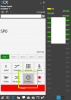
Start by making a phone call to the first participant of the party, once established, click on 'Conference'
upload_2017-11-20_17-47-12.png
You will now be transferred to the Conference Room with your private conference.

Adding Participants
To add another participant, click on 'Line 2' and dial the next participants number.

Then once in communication with them, click the 'Conference' button again. 3CX will then transfer them and you into the Private Conference you first created. You will then have three participants in your ad-hoc conference.

You can continue to do this until you run out of Concurrent Call license or your SIP/Voice Channels.

Managing Participants
To Manage the participants in the conference like you could in SP1 and before you now need to login to the WebClient.

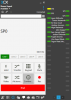
The fastest way to get to Conferences in the WebClient is to go via the Softphone Conference button
n6vN2_aUnfx6b_KP4B4sWgkanglPJU_HG_U5dBMm0FfN7GXtvLMmZ4uKLwYKQnnJdfMnD-jhMFK07miy5Md0b4ifiVklRhiVlLE60ofpDu6Sk2JQCHXQz8sVgknHaN_Irw
and then click on 'View Conferences'.

NOTE: You WILL require your WebClient password to login if you are not already logged in.

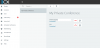
Then click on 'My Private Conference' and you can see the participants in the conference and easily disconnect them (Or re-connect them if they drop).
upload_2017-11-20_17-53-21.png

Note: The only way to truly 'End' the Conference is via the WebClient, or hope all participants hang up.
Hopefully this helps some people with the fun we're all having with these undocumented changes.
 

Attachments

  • upload_2017-11-20_17-46-7.png
    upload_2017-11-20_17-46-7.png
    31.1 KB · Views: 10
3CX, Please either bring back the SoftPhone functionality for Ad-Hoc conferencing (as per https://www.3cx.com/user-manual/video-conferencing/ ) , or allow auto login to the WebClient when the user clicks on the button in the SoftPhone so they are not needing to login.
 
  • Like
Reactions: sofiane
You can probably still create manually ad hoc a conference call described above and you can send manually emails people to dial the conference DID number and enter pin, e.g. '0000' to join a conference -- much like the method in sp1, but manually organizing the conference.

We need ASAP a SP3 to bring back the old conference functionality and to fix other issues with 3CX client for Android, call recording and others (possibly).
 
You can probably still create manually ad hoc a conference call described above and you can send manually emails people to dial the conference DID number and enter pin, e.g. '0000' to join a conference -- much like the method in sp1, but manually organizing the conference.

Yes but that's not an Ad-Hoc conference, that's a scheduled conference for right now. Very big difference when you're on the phone with somebody and want to quickly conference somebody in.
 
  • Like
Reactions: sip.bg
Just a small note: on iOS and Android clients, the dialpad's Conference button is still working "old-style".
 
So maybe I am missing something you are trying to do but you can dial in and create an audio conference on the fly

Dial your conference extension 700
Dial 100*1000

Where 100 is the conference number you are creating and 1000 is the system wide PIN.

Works great.

Hi Mark,

Yes 3CX has a conferencing facility, this has been available for many versions now.

The issue is around the 'instant' conferencing that was available in the Softphone. (Read more here on the old method: https://www.3cx.com/user-manual/video-conferencing/ ).

This allowed you to actively phone and connect people to the conference, rather than having users phone in.
 
  • Like
Reactions: Aputsiaq
Just a small note: on iOS and Android clients, the dialpad's Conference button is still working "old-style".

Thanks for the info Vali :), good to know, but I assume it won't last (Unless 3CX are going to look at rolling the feature back for the desktop).
 
My android client (with the QR code facility) takes you to the web client when you click the conference button and not in a call.
 
Same story here - IOS client bring to the web page, all of our users are frustrated about this.
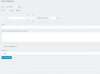
And more - in the webclient there is no way to add participants for scheduled conference, the area is just missing, so you're always creating an empty conference. 3cx, please advse.upload_2017-11-22_11-51-15.png
 
  • Like
Reactions: Randall
@pact can you please clarify one of your statements from your initial post?
You can continue to do this until you run out of Concurrent Call license or your SIP/Voice Channels.

How exactly does this work for phone conferences? i.e. we are looking to buy the right license atm and we are 10 employees so basically a 4 sim calls license would suffice but we have one weekly conference where we have 2-3 internal participants and 10-20 external ones.

Would this mean I need a a 20 sim calls license to create such a phone conference?
 
Same story here - IOS client bring to the web page, all of our users are frustrated about this.
As one of iOS client's developers, I know it very well, and you're wrong: I specified very clear in my message above "dialpad's Conference button".

So, to recap:
- you're ext 100
- all lines are idle
- on line 1 make a call to 101
- tap dialpad's conference button - it makes immediately adhoc conf to 101, your display should show 700**100
- tap again dialpad's conference button - it will show View conferences window.
- in View Conferences tap the + button - you can add from contacts or direct number. Choose 102 - it will join your conference. Press Done
- on the dialpad, tap Line 2 and make a call to 103
- tap Line 2's dialpad conference button - it will close and you will be redirected to Line 1, where 103 has joined you, 101 and 102
- make an incoming call from 104 and accept it on Line 2
- tap Line 2's dialpad conference button - it will close and you will be redirected to Line 1, where 104 has joined you, 101, 102 and 103

The Webclient opens from More/Create Conference option
 
Last edited:
As one of iOS client's developers, I know it very well, and you're wrong: I specified very clear in my message above "dialpad's Conference button".

So, to recap:
- you're ext 100
- all lines are idle
- on line 1 make a call to 101
- tap dialpad's conference button - it makes immediately adhoc conf to 101, your display should show 700**100
- tap again dialpad's conference button - it will show View conferences window.
- in View Conferences tap the + button - you can add from contacts or direct number. Choose 102 - it will join your conference. Press Done
- on the dialpad, tap Line 2 and make a call to 103
- tap Line 2's dialpad conference button - it will close and you will be redirected to Line 1, where 103 has joined you, 101 and 102
- make an incoming call from 104 and accept it on Line 2
- tap Line 2's dialpad conference button - it will close and you will be redirected to Line 1, where 104 has joined you, 101, 102 and 103

The Webclient opens from More/Create Conference option
Vali, thanks for the reply. I probably gave not enough details, I meant when user is trying to create a conference from "Create conference" menu in IOS app - redirect to WebApp looks very very weird.
 
As we got the complain from our customers regarding the new way create conference. We back to SP1:(
Very frustrating situation!!!!!
 
  • Like
Reactions: sip.bg
@pact can you please clarify one of your statements from your initial post?


How exactly does this work for phone conferences? i.e. we are looking to buy the right license atm and we are 10 employees so basically a 4 sim calls license would suffice but we have one weekly conference where we have 2-3 internal participants and 10-20 external ones.

Would this mean I need a a 20 sim calls license to create such a phone conference?

Hi Ovizii,

Yes, as has always been with 3CX, the licensing is based around Concurrent phone calls, internal or external.

So if you are sizing a system ready for 20 conferencing participants you will need to purchase the 32 Channel 3CX system :)

Also make sure your SIP providers have enough channels to handle this 10-20 external call requirement too.
 
  • Like
Reactions: ovizii
We've been using 3cx since v8, so we like it but are becoming increasingly frustrated most recently. We used to look forward to the new updates now we have to look for all the functions that have been changed or removed so we can decide how many clients this is going to upset.
When we sell the system it's sold on the basis of the function it can deliver at a given point, not on the concept of the functions only working until the next release.

Reference this conference issue; I've got a customer who provide a service to the Police. I've just had to roll them back to SP1 out of hours because they can no longer dial in other parties in to the conference. The function required is very simple and worked until SP2.

The process used is:
1. Police Call in >
2. Call Centre answer >
3. and conference in by dialling several numbers 3-10 different parties.

These parties are not going to wait to receive an email, they could be anywhere in the world without email, it could be critical for that conference to take place.

I hope that add's some context to the issue and as such you can reinstate this basic and primitive conference function.
 
  • Like
Reactions: shenwei and sip.bg
We are also servicing a police / security guards. They need ad-hoc conferencing, where person on-duty initiates conferences with up to 30 persons (to their mobile phones) in emergency situations and gives them instructions, whatever. I had to revert to SP1 after a big scandal, because SP2 killed ad-hoc conferencing.
@Nick Galea, please release ASAP SP3 which brings back functionality from SP1 plus new calendars methods and fix finally issues with mobile client for Android (to stop breaking GSM calls) -- these are the most irritating issues customers complain. 3CX is a very good product, but customers want to be able to do their job, when they paid for having a PBX. When changes are made, backward compatibility should be retained, otherwise there are lots of problems with existing installations / working habits of people. New features are always welcome, but they should be an addition, not replacement of existing functionality.
 
  • Like
Reactions: shenwei and Owen
TBH, I the "workaround" described by @pact looks way easier than it was before. It is very similar to Ad Hoc conferences on deskphones.
For me, the best solution would be to fix the issue that the conference call continues if the organizer ends the call so you don't have to hope that the other parties hang up.
 
For me, the best solution would be to fix the issue that the conference call continues if the organizer ends the call so you don't have to hope that the other parties hang up.

Conferences only end once all parties have exited.

If the Organizer leaves, this has no effect on the conference. If this was the case, everytime the organizer had a network disconnection, everyone in the meeting would need to reconnect.
 
Status
Not open for further replies.

Forum statistics

Threads
111,879
Messages
589,531
Members
164,732
Latest member
36710