How to simulate a failure with IP based registration?

Status
Not open for further replies.

pmterp

Gold Partner
Advanced Certified
Joined
Jun 13, 2017
Messages
420
Reaction score
249
We had an issue last week that resulted in termination failing, the issue has since been resolved.
During that time, it didn't appear to be attempting termination via the backup IP but I can't confirm that.
I wanted to simulate a failure on the primary IP so that I can ensure the utilization of the backup IP is working but haven't been able to find a way to do that.
The trunk doesn't require registration (IP based authentication) so I have the primary IP listed in the Registrar field of the General tab and have listed the backup IP in the Alternative Proxy field.
If I purposefully put an incorrect IP in the Registrar field, it doesn't automatically try the proxy IP.
Is there a way to make it try to use the proxy IP to see if it is working properly?
 
Thank you for the reply. Can you elaborate on the following:
For an IP-based SIP Trunk to failover, it must have an FQDN as Registrar and/or Outbound Proxy configured in the 3CX SIP Trunk settings, and the FQDN must have either an NAPTR and/or SRV records.
The "and/or" may be the part I'm misinterpreting. Does this mean that either the Registrar or Proxy field must have an FQDN (they can't both be IP based)?
So in the case of a carrier providing a primary and secondary IP, the proxy would not be utilized?
 
May i ask if this is a TLS connection with your provider?
 
For the PBX to failover to the backup IP one of two conditions must be met.
1. The trunk trying and failing the primary IP for 32 seconds
2. Get an error code from the primary IP that will force the PBX to switch to the secondary IP for the next call.

Since you are trying with an incorrect IP I am assuming you are not getting any replies back so you should let the PBX timeout at 32 seconds. Then it will switch to the second IP. If you are hanging up before hitting 32 seconds then the PBX will just keep trying the same IP.
 
For the PBX to failover to the backup IP one of two conditions must be met.
1. The trunk trying and failing the primary IP for 32 seconds

Since you are trying with an incorrect IP I am assuming you are not getting any replies back so you should let the PBX timeout at 32 seconds. Then it will switch to the second IP. If you are hanging up before hitting 32 seconds then the PBX will just keep trying the same IP.
Thanks for the feedback. I did not end the call, it ends itself when it reaches the timeout (I'm assuming 32 seconds). I also read somewhere that once a call fails it'll route to the proxy so I tried allowing one to timeout which disconnects and then initiate another call but it still tries the initial IP until the call fails again.
 
Just tried the same test with an IP based trunk and the failed over as it should. I set the registrar to 1.1.1.1 and the alternative proxy to 2.2.2.2. I made a call and it dialled 1.1.1.1 for 32 seconds and then failed.
Next call went straight to 2.2.2.2

In your Options tab what you do have under "Transport Protocol" ? If you have "Any" try to set it up to UDP and try again.
 
Thank you for taking time to check this out with me.
I did confirm that transport protocol is set to UDP.
Just now I tested each of the 2 IPs (primary and secondary) by taking turns setting them as the Registrar address and making a test call. Both worked as expected.
I then changed the Registrar address to 1.1.1.1 and attempted a call. It timed out after 32 seconds but there was no attempt made to the secondary IP entered in the proxy field.
However, I then attempted a 2nd call and it was routed over the proxy IP.
If this is the way it is supposed to be, I'll move on but I wanted to be sure there wasn't something I could do to automatically make it attempt the proxy IP without the user having to initiate a new call.
 
However, I then attempted a 2nd call and it was routed over the proxy IP.
If this is the way it is supposed to be, I'll move on but I wanted to be sure there wasn't something I could do to automatically make it attempt the proxy IP without the user having to initiate a new call.
That is the way it's supposed to work. The second call will route to the failover IP after the first call times out.
 
  • Like
Reactions: pmterp
Ok, I've moved on to testing adding a 2nd provider for termination on a separate trunk.
I setup the secondary trunk, set an outbound rule to use that trunk only, made a test call and it was successful. So I know the trunk works and is configured correctly for termination.
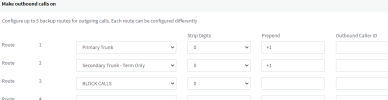
I then went in and changed the outbound rule to the following:
outboundrule.png
I went into the primary trunks settings and set the registrar IP to 1.1.1.1 and disabled the proxy.
I made a test call to the same number and it timed out at 32 seconds (I never pressed the disconnect button) (testing using the 3CX webclient).
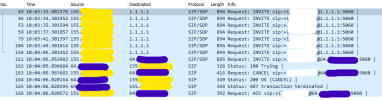
As you can see from the capture below, the call was attempted with the primary and failed/timed out at 32 seconds as expected. It then tried the secondary trunk as expected but .09 seconds later, the PBX sent a SIP Cancel.
cancel.png
I had stopped the capture at that point but did reattempt the call thinking it would count the primary trunk as unregistered/unavailable and go straight to the secondary trunk but it did not. The same process as above was repeated.
In the above screenshot, the yellow is the PBX and the purple is the secondary trunk.
 
Sorry, but I have another scenario that isn't working as I would have expected. Our primary trunk provider gave me an IP I could use to generate an error response (as opposed to a timeout).
I setup the primary trunk with the IP set to return a 500 error as the registrar and enabled the proxy with a working IP for termination. I also adjusted the outbound rule to not include any other trunk for this test.
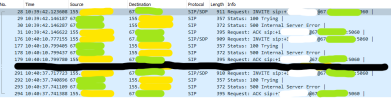
As you can see from the below capture, only the registrar IP was attempted and did return a 500 error. However, the call was immediately ended without trying the proxy IP. I attempted a 2nd call and then waited and tried a 3rd in case the system needed time to fail over but all 3 attempts were only sent to the registrar and then ended.
500error.png
Yellow is the PBX and green is the registrar IP.

To be clear, here is what I'm trying for/assumed was working:
We have a primary SIP trunk with a primary and secondary IP for termination and a secondary SIP trunk from another provider with a primary and secondary IP for termination. Outbound calls would be attempted with the primary SIP trunk's IPs and if not successful, then the secondary SIP trunk's (separate provider) IPs. All are using IPs and not FQDNs/registration.
 
One thing that does seem to work as expected.
On the primary trunk I disabled the proxy and moved that IP to a secondary trunk. I left the primary SIP trunk IP as the one that returned a 500 error and updated the outbound rule to try the primary trunk and then the secondary.
In this case, the primary trunk returned the 500 error and then immediately completed the call through the secondary trunk.
So, in the event of the timeout, the secondary trunk was attempted but immediately canceled but in the event of an error, the secondary trunk was utilized successfully.
 
I went into the primary trunks settings and set the registrar IP to 1.1.1.1 and disabled the proxy.
I made a test call to the same number and it timed out at 32 seconds (I never pressed the disconnect button) (testing using the 3CX webclient).
As you can see from the capture below, the call was attempted with the primary and failed/timed out at 32 seconds as expected. It then tried the secondary trunk as expected but .09 seconds later, the PBX sent a SIP Cancel.

This happens because the Webclient has its own 32 second timeout so it drops the call. If you try the same scenario from an IP phone the call will route through the second route.

Sorry, but I have another scenario that isn't working as I would have expected. Our primary trunk provider gave me an IP I could use to generate an error response (as opposed to a timeout).
I will look into this and let you know
 
This happens because the Webclient has its own 32 second timeout so it drops the call. If you try the same scenario from an IP phone the call will route through the second route.
Oh, okay, thank you. Does that apply to the Windows app and mobile app as well (I have not had a chance to test these yet)?
 
Oh, okay, thank you. Does that apply to the Windows app and mobile app as well (I have not had a chance to test these yet)?
This also applies to the Desktop app since its also WebRTC but not for mobile clients. Mobile clients will not timeout after 32 seconds.

Regarding the alternative proxy failover for IP based trunks this will occur only an Invite gets no response (32 seconds) or gets either a 408 Request Timeout or a 503 service unavailable. For all other errors the same target will be used.
 
Status
Not open for further replies.

Latest Posts

Members Online Now

Forum statistics

Threads
111,831
Messages
589,276
Members
164,660
Latest member
RJenkinsROCK