Hubspot CRM Integration "Call Pop-ups"

Status
Not open for further replies.

gbhouston

Customer
Joined
Jan 15, 2020
Messages
11
Reaction score
1
Hi all,

I've recently upgraded to 3CX 16 Pro and have been exploring the integration capabilities with our Hubspot CRM. I've successfully configured the connection and I'm seeing contact sync and call journaling working just fine, however the "call pop-up" feature seems to be eluding me.

On the 3CX support page for Hubspot integration, it describes a feature known as "call pop-ups."
  • Call Pop-ups – when using the 3CX Web Client, the customer record is displayed automatically when you receive a call.
However, this function doesn't seem to be working for me. When I'm logged into the webclient and receive a call from a Hubspot contact, there is no "pop-up" of any sort. Do any of you have experience with this feature? What does it look like in practice? Perhaps I'm envisioning something that it was never intended.

Any input would be greatly appreciated.
 
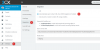
The call pop up is the Web Client launching the contact record in a new browser tab. In order to enable this, you should configure the Web Client as follows:
13912

If this is still not working, you should check the following:
  1. The browser might be blocking the popup, so please check if the address bar is showing the popup blocked icon.
  2. If you are using 3CX v16 Update 4 and the new Chrome Extension, the automatic popup will not work. This is a known issue that will be fixed in Update 5. In this case, you should disable the Chrome Extension until Update 5 is released.
 
  • Like
Reactions: Evolute IT
Ernesto,

Thanks for the quick reply. I am using Update 4 and did have the new Chrome Extension installed, so thanks for the info on the bug. However, I disabled the extension in Chrome and an still not seeing a pop-up.

I also don't see the blocked popup icon in the address bar. Are there any addition settings in Chrome I might need to adjust? Looks like I'm using the most recent version of Chrome (Version 79.0.3945.117).


The call pop up is the Web Client launching the contact record in a new browser tab. In order to enable this, you should configure the Web Client as follows:
View attachment 13912

If this is still not working, you should check the following:
  1. The browser might be blocking the popup, so please check if the address bar is showing the popup blocked icon.
  2. If you are using 3CX v16 Update 4 and the new Chrome Extension, the automatic popup will not work. This is a known issue that will be fixed in Update 5. In this case, you should disable the Chrome Extension until Update 5 is released.
 
Can you share a screenshot of your browser running the Web Client when you receive an inbound call from a contact you know is in Hubspot?
 
  • Like
Reactions: Evolute IT
Sure.
 

Attachments

  • Screen Shot 2020-01-15 at 1.57.54 PM.png
    Screen Shot 2020-01-15 at 1.57.54 PM.png
    298.9 KB · Views: 75
I also just checked out the "site settings" in Chrome and allowed everything for this site. Still no luck.
 
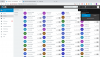
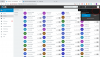
Thanks for sharing the screenshot. I can see that the contact that is calling you is not a CRM contact:
13914

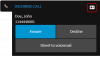
When a matched CRM contact calls you, the call ringing toaster shows the contact button:
13915

So, this contact is probably being matched to a normal contact in 3CX Contacts, and that's why the popup is not working. You should delete this contact from 3CX Contacts, and then the popup should work.
 
  • Like
Reactions: Evolute IT
Awesome! Worked that time. Thanks so much for your help! Heads up I'm also going to be creating another forum post for an issue I'm running into with the Office 365 integration.
 
  • Like
Reactions: edossantos
Awesome! Worked that time. Thanks so much for your help! Heads up I'm also going to be creating another forum post for an issue I'm running into with the Office 365 integration.
Also make sure to use the Phone Number field in HubSpot. Mobile and Business Phones are not searched via the API from what the 3CX docs says.

Having the numbers in the same format also helps (generally E164).
 
Status
Not open for further replies.

Members Online Now

No members online now.

Forum statistics

Threads
111,831
Messages
589,277
Members
164,660
Latest member
RJenkinsROCK