- Joined
- Feb 3, 2016
- Messages
- 9
- Reaction score
- 0
Hello everyone. We are using the Hubspot integration according to this:
https://www.3cx.com/docs/hubspot-pbx-crm-integration/
If someone calls, then it opens a website from Hubspot with all contact information, like this:
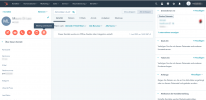
So far, so good. Now my issue:
In the 3CX Desktop App for Mac it does not show the contact name, it shows the number like it's unknown. Like this:
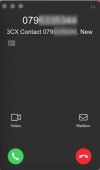
I think the issue is that the phone number is not stored in the 3CX internal phone book.
Question: Is there any way to show the correct contact name from Hubspot directly in 3CX Desktop app? I don't want to have to manage the contact details twice, once in Hubspot and then again in 3CX's internal phonebook.
https://www.3cx.com/docs/hubspot-pbx-crm-integration/
If someone calls, then it opens a website from Hubspot with all contact information, like this:
So far, so good. Now my issue:
In the 3CX Desktop App for Mac it does not show the contact name, it shows the number like it's unknown. Like this:
I think the issue is that the phone number is not stored in the 3CX internal phone book.
Question: Is there any way to show the correct contact name from Hubspot directly in 3CX Desktop app? I don't want to have to manage the contact details twice, once in Hubspot and then again in 3CX's internal phonebook.