- Joined
- Jul 9, 2018
- Messages
- 697
- Reaction score
- 166
I've had a frustrating 24 hours going through the process for WhatsApp integration over and over again without it working... I followed the YouTube video several times and it didn't matter what I did it just simply didn't work. No error messages and everything looked perfect. I just didn't get it, our install is the most vanilla of installs and I religiously and meticulously followed the instructions.
WhatsApp messages sent to our number got two grey ticks but they never turned blue and were never received.
There were no error messages and test messages from the Meta developers account were sent without issue.
I was about to give up and post on here to ask for some suggested troubleshooting methods / steps when I, completely accidentally, stumbled across this under Settings - Options:
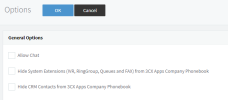

Two clicks and the problem is solved. My head is now slumped on the desk at the thought of all of those wasted hours sat swearing at the Meta developers portal while doing the same thing over and over.
It seems blindingly obvious after the fact but if someone, long ago, turned off chat then your chat integration will not work.
I put this here in the hope that the next person with this issue finds this post and that 3CX might update their config guide to include that chat must be enabled, maybe under prerequisites?
I'm off to have a hot coffee and a strong word with myself .
.
WhatsApp messages sent to our number got two grey ticks but they never turned blue and were never received.
There were no error messages and test messages from the Meta developers account were sent without issue.
I was about to give up and post on here to ask for some suggested troubleshooting methods / steps when I, completely accidentally, stumbled across this under Settings - Options:
Two clicks and the problem is solved. My head is now slumped on the desk at the thought of all of those wasted hours sat swearing at the Meta developers portal while doing the same thing over and over.
It seems blindingly obvious after the fact but if someone, long ago, turned off chat then your chat integration will not work.
I put this here in the hope that the next person with this issue finds this post and that 3CX might update their config guide to include that chat must be enabled, maybe under prerequisites?
I'm off to have a hot coffee and a strong word with myself
.