Incoming call issues for Oppo A12

Status
Not open for further replies.

Kwang Mien

Silver Partner
Advanced Certified
Joined
May 14, 2020
Messages
255
Reaction score
17
Hi,

We are using 3CX version 16 and one of our customers is having incoming call issue to her Oppo A12 phone. She is not able to receive any incoming call from external or from another extension.

These are the following has been tried but still could not resolve the issue :

a. Reinstall 3cx on her phone and restart her phone
b. Re-provision her account on 3CX
c. Disable the Telecom API setting in 3CX
d. Tried to disable the Battery Optimization but could not

Can anyone advise what other ways to resolve this incoming call issue ?

Thanks

Regards,
Kwang Mien
 
Do you currently have other users, with the same make/model of phone, that have it working properly?

Have you checked the 3CX Activity Log, after a call attempt, to see if there is some other reason that the call does not complete?

Are they able to place outgoing calls?

Does this happen when using 3/4G and Wifi (local LAN and remote)?
 
  • Like
Reactions: VasilisV_3CX
Hello @Kwang Mien ,

I agree with all that leejor asked, in addition, if for the extension that you have provisioned on the Oppo Android, you log into the WebClient, do you then receive calls? Just top determine if the problem is generally with the Extension, or only with the Android App.

What version of the 3CX App do you have installed and what version is your 3CX Server?

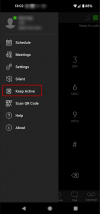
Also, if you enable "Keep Alive", does it work then?
1641467048067.png
 
Hello @Kwang Mien ,

I agree with all that leejor asked, in addition, if for the extension that you have provisioned on the Oppo Android, you log into the WebClient, do you then receive calls? Just top determine if the problem is generally with the Extension, or only with the Android App.

What version of the 3CX App do you have installed and what version is your 3CX Server?

Also, if you enable "Keep Alive", does it work then?
View attachment 26904
i) When there is an incoming call, the 3cx windows app will ring, but the 3cx mobile will not ring.
ii) 3CX server version is 16.0.9
iii) i will need to find out the 3cx app version

i will ask user to enable the keep alive and see how it goes.
 
Do you currently have other users, with the same make/model of phone, that have it working properly?

Have you checked the 3CX Activity Log, after a call attempt, to see if there is some other reason that the call does not complete?

Are they able to place outgoing calls?

Does this happen when using 3/4G and Wifi (local LAN and remote)?
i) currently, only this user is using Oppo A12
ii) have not conduct the check on the activity logs. in the user's case, the 3cx windows app was ringing but not the mobile app. from the activity logs, how can i check if there is issue for the mobile app ?
iii) outgoing calls is ok
iv) user is connected to WIFI having issue. as for 3/4G it was not tested.
 
i) When there is an incoming call, the 3cx windows app will ring, but the 3cx mobile will not ring.
ii) 3CX server version is 16.0.9
iii) i will need to find out the 3cx app version

i will ask user to enable the keep alive and see how it goes.
This is an important test, let me know so that we can determine if this is something PUSH-related, or something else.
 
This is an important test, let me know so that we can determine if this is something PUSH-related, or something else.
User is able to receive call after enabling the Keep Alive. is this Keep Alive setting PUSH related ?
 
Enabling Keep-alive will essentially make the 3CX mobile app independent to PUSH which now tells us that the problem you had was probably PUSH related.

If you want to look into this further I suggest first thing you do is test on a different network or a 3/4G network as to eliminate the possibility of this being a network issue.
 
Status
Not open for further replies.

Members Online Now

Forum statistics

Threads
111,832
Messages
589,278
Members
164,662
Latest member
DejanMDS