Integrate Microsoft teams on 3CX v20

RM-Da

Silver Partner
Joined
May 7, 2025
Messages
26
Reaction score
7
Hi guys

I've a issue about the integration of Teams.
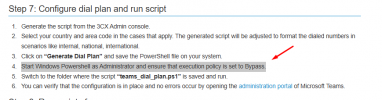
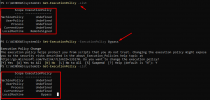
I dont' undertand which is the ricght command to use for the execution policy as reported on official guide. Some one can help me?


1755609876179.png
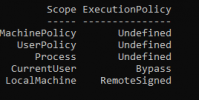
Ive used this command on my domain device but I don't know if that is correct or not

PS C:\WINDOWS\system32> Set-ExecutionPolicy -ExecutionPolicy Bypass

1755609976911.png

thanks a lot
 
Hi guys

I've a issue about the integration of Teams.
I dont' undertand which is the ricght command to use for the execution policy as reported on official guide. Some one can help me?


View attachment 49012
Ive used this command on my domain device but I don't know if that is correct or not

PS C:\WINDOWS\system32> Set-ExecutionPolicy -ExecutionPolicy Bypass

View attachment 49013

thanks a lot
That should work. If not, I like to use "Set-ExecutionPolicy -ExecutionPolicy Bypass -Scope CurrentUser".
 
  • Like
Reactions: RM-Da
Yes, then just run the two scripts following the docs.
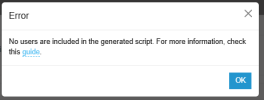
I've done all but when I try to download the last script I've that

1755617724954.png

On the M365 integration I can easily see all the users, I added the one where I assigned the Team Phone license.

?????
 
Last edited:
I've done all but when I try to download the last script I've that

View attachment 49021

On the M365 integration I can easily see all the users, I added the one where I assigned the Team Phone license.

?????
Do you see a checkmark in the Users list under the Teams icon, near the end? If not, the user hasn't synced completely yet. It will sync automatically overnight after the initial sync.
 
  • Like
Reactions: KyriacosS_3CX
Do you see a checkmark in the Users list under the Teams icon, near the end? If not, the user hasn't synced completely yet. It will sync automatically overnight after the initial sync.
hi
do you intented that ?

1755702624113.png
yes the checkmark are present.
 
I've done all but when I try to download the last script I've that

View attachment 49021

On the M365 integration I can easily see all the users, I added the one where I assigned the Team Phone license.

?????
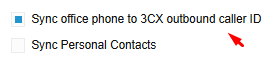
Please verify that the user accounts in 365 have an office phone number specified in E164 format, and that this number is also listed under each user's Outbound caller ID section in the 3CX users' extensions.

Additionally, you may check here.
 
Please verify that the user accounts in 365 have an office phone number specified in E164 format, and that this number is also listed under each user's Outbound caller ID section in the 3CX users' extensions.

Additionally, you may check here.
OK
now I've set the nunmber on M365 and I see also that on 3CX users' extension.
The download of script now is right.

1755773310836.png

1755773504873.png

1755773342270.png
I try to run the script on PC.
 
so after to run that

Set-ExecutionPolicy -Scope Process -ExecutionPolicy Bypass

and running the script I've this issue

Set-CsPhoneNumberAssignment : Termine 'Set-CsPhoneNumberAssignment' The name is not recognized as a cmdlet,function, operable program, or script file. Check the spelling of the
name or verify that the path is included and correct, then try again.
In C:\Users\a.xxxxxx.NETCOM\Downloads\map_users.ps1:4 car:1
+ Set-CsPhoneNumberAssignment -Identity [email protected] -Enterpri ...
+ ~~~~~~~~~~~~~~~~~~~~~~~~~~~
+ CategoryInfo : ObjectNotFound: (Set-CsPhoneNumberAssignment:String) [], CommandNotFoundException
+ FullyQualifiedErrorId : CommandNotFoundException


Set-CsPhoneNumberAssignment : Termine 'Set-CsPhoneNumberAssignment' The name is not recognized as a cmdlet, function, operable program, or script file. Check the spelling of the
name or verify that the path is included and correct, then try again.
In C:\Users\a.xxxxxx.NETCOM\Downloads\map_users.ps1:5 car:1
+ Set-CsPhoneNumberAssignment -Identity [email protected] -PhoneNum ...
+ ~~~~~~~~~~~~~~~~~~~~~~~~~~~
+ CategoryInfo : ObjectNotFound: (Set-CsPhoneNumberAssignment:String) [], CommandNotFoundException
+ FullyQualifiedErrorId : CommandNotFoundException


New-CsBatchPolicyAssignmentOperation : Termine 'New-CsBatchPolicyAssignmentOperation' The file name is not recognized as a cmdlet, function, operable program, or script file.
Check the spelling of the name or verify that the path is included and correct, then try again.
In C:\Users\a.xxxxxx.NETCOM\Downloads\map_users.ps1:7 car:1
+ New-CsBatchPolicyAssignmentOperation -PolicyType TenantDialPlan -Poli ...
+ ~~~~~~~~~~~~~~~~~~~~~~~~~~~~~~~~~~~~
+ CategoryInfo : ObjectNotFound: (New-CsBatchPolicyAssignmentOperation:String) [], CommandNotFoundException
+ FullyQualifiedErrorId : CommandNotFoundException


New-CsBatchPolicyAssignmentOperation : Termine 'New-CsBatchPolicyAssignmentOperation' The file name is not recognized as a cmdlet, function, operable program, or script file.
Check the spelling of the name or verify that the path is included and correct, then try again.
In C:\Users\a.xxxxxx.NETCOM\Downloads\map_users.ps1:8 car:1
+ New-CsBatchPolicyAssignmentOperation -PolicyType OnlineVoiceRoutingPo ...
+ ~~~~~~~~~~~~~~~~~~~~~~~~~~~~~~~~~~~~
+ CategoryInfo : ObjectNotFound: (New-CsBatchPolicyAssignmentOperation:String) [], CommandNotFoundException
+ FullyQualifiedErrorId : CommandNotFoundException

New-CsBatchPolicyAssignmentOperation : Termine 'New-CsBatchPolicyAssignmentOperation' The file name is not recognized as a cmdlet, function, operable program, or script file.
Check the spelling of the name or verify that the path is included and correct, then try again.
In C:\Users\a.xxxxxx.NETCOM\Downloads\map_users.ps1:9 car:1
+ New-CsBatchPolicyAssignmentOperation -PolicyType TeamsCallingPolicy - ...
+ ~~~~~~~~~~~~~~~~~~~~~~~~~~~~~~~~~~~~
+ CategoryInfo : ObjectNotFound: (New-CsBatchPolicyAssignmentOperation:String) [], CommandNotFoundException
+ FullyQualifiedErrorId : CommandNotFoundException
 
Last edited:
someone can help me?
 

When I run the 3CX scripts, I'm getting an error saying ‘The term ‘set-XYZ is not recognized’​

This can result from two common sources

  • If you don’t run the scripts via an elevated PowerShell prompt, which then fails to install the necessary PowerShell Teams module.
  • If you have already installed the PowerShell module for Skype for Business or Teams, but they are outdated.
Check the version by running Get-InstalledModule in PowerShell.

2.3.1 or higher is expected.

Check the version by running Get-InstalledModule in PowerShell
(Check the version by running Get-InstalledModule in PowerShell)

If you don’t see an installed version, or on an older version is displayed, run

Install-Module -Name MicrosoftTeams -Force

from an elevated PowerShell, terminal to install/update to the latest version.
 
  • Like
Reactions: Charles_3CX

When I run the 3CX scripts, I'm getting an error saying ‘The term ‘set-XYZ is not recognized’​

This can result from two common sources

  • If you don’t run the scripts via an elevated PowerShell prompt, which then fails to install the necessary PowerShell Teams module.
  • If you have already installed the PowerShell module for Skype for Business or Teams, but they are outdated.
Check the version by running Get-InstalledModule in PowerShell.

2.3.1 or higher is expected.

Check the version by running Get-InstalledModule in PowerShell
(Check the version by running Get-InstalledModule in PowerShell)

If you don’t see an installed version, or on an older version is displayed, run

Install-Module -Name MicrosoftTeams -Force

from an elevated PowerShell, terminal to install/update to the latest version.
hi

I made that but the result is different and i try again to run the second script but the issue is the same

1755872543461.png
then I made another think

Install-Module -Name MicrosoftTeams
Connect-MicrosoftTeams

used the admin user of tenant of M365
1755875833980.png
and run the script
1755875799099.png

I try to use teams to make a calls.... between internal works fine but to external number no. I've to make something on Outbound route on 3CX or I've to change something os SBC of teams????
 
Last edited:
Check the outbound rules now to ensure they can process calls to numbers from teams. Generally, the calls from teams are in E164 format, so you may ensure that there is a rule that can process calls with this format.
 
  • Like
Reactions: Evolute IT
Check the outbound rules now to ensure they can process calls to numbers from teams. Generally, the calls from teams are in E164 format, so you may ensure that there is a rule that can process calls with this format.
Can you show me an example about that? thanks.

1756113960527.png
what do I have to set that on outbound rules?
1756114019702.png
 

Attachments

  • 1756113938523.png
    1756113938523.png
    11.1 KB · Views: 1
Last edited:
any suggestions?
 
I need help, somene can explain me how I can resolved that between teams and 3CX? thanks
 
Check the outbound rules now to ensure they can process calls to numbers from teams. Generally, the calls from teams are in E164 format, so you may ensure that there is a rule that can process calls with this format.
Hi
any suggest? because I dont' know how to make that!
thanks
 
it's been resolved here
 

Members Online Now

Forum statistics

Threads
111,831
Messages
589,277
Members
164,660
Latest member
RJenkinsROCK