Solved IOS / ANDROID APP can't pickup calls

Status
Not open for further replies.

Christian klarer

Bronze Partner
Basic Certified
Joined
Jan 30, 2019
Messages
39
Reaction score
5
On an installation I can't pickup a call from a android/ios device. On the app it shows Anfrage fehlgeschlagen, then it lists a missed call. It doesn't matter if it's from
a ceue or DID, same behaviour. I can make a outbound call and internall calls work as well.

When I try to pick up the call it shows this in the log:

08/31/2021 11:32:05 AM - [CM503003]: Call(C:781): Call to <sip:[email protected]:0> has failed; Cause: 487 Request Terminated/INVITE from 127.0.0.1:5483

Any help would be appreciated
 
I can make calls internal and external and can pickup internal calls.
I can't pickup external calls.

Version Pro 16.0.8.9 on Linux 3cx ISO
Firewall Checker ok exept full cone nat
 
Last edited:
3cx is on premise
Trunk is peoplefone.ch

Firewall is Securepoint, they do know about 3cx full cone nat.
Full Cone Nat doesnt work in any installations but it‘s never an issue.
 
Hi @Christian klarer,

If you log into the Webclient with that extension, can you receive external calls using the Webclient (or anything other than the mobile clients?)
 
Hi Vasilis
Yes, desk phone (yealink) works, windows app and webclient work as well
 
Hi @Christian klarer,

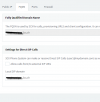
Is your Local SIP domain set to your FQDN? You can find this setting under Settings >> Network >> FQDN tab >> Settings for Direct SIP Calls section.
 
1630585250823.png

looks right to me, checked back with other installations
 
Hi @Christian klarer,

To clarify, you see the phone ringing but you're unable to answer it, or it does not ring at all and you're just receiving a notification after the call?
 
1. I see the call ringing
2. I try to pick up -> it stops ringing
3. Top right I get the text "Call failed"
4. From the caller side it keeps on ringing
5. In the log I get <sip:[email protected]:0> has failed; Cause: 487 Request Terminated/INVITE from 127.0.0.1:5483
6. In the app I see a missed call
 
Hi @Christian klarer,

Can you ensure that the mobile phones are on the same local network as the PBX and test if this happens?

Also, do you have another PBX you could test this on?
 
Last edited:
I do have 20 pbx, all with apps working
i compared configurations and can't seem to find anything different, it's frustrating. I dont have the possibility to use the mobile in the same network as the pbx.
 
Hi @Christian klarer,

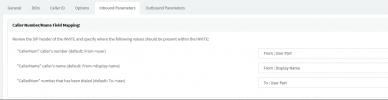
Can you set up your SIP Trunk Inbound Parameters as follows:

1630673635625.png

Can you let me know if this resolves your issue?
 
It did, as we checked yesterday. Thanks fo the support.
 
Hi @Christian klarer,

Great, this should resolve the issue. If you have any other issues, feel free to let me know. Have a great weekend!
 
Status
Not open for further replies.

Members Online Now

Forum statistics

Threads
111,831
Messages
589,277
Members
164,660
Latest member
RJenkinsROCK