


- Joined
- Jul 14, 2021
- Messages
- 17
- Reaction score
- 1
Im new to 3CX and IP phones in general.
I have a test bench with 3CX running on AWS EC2, a Twillio SIP Trunk, the SBC on premises running on Debian, and 4 Fanvil X3U.
So far my tests are going well but it annoys me that I must hit "#", or hit the soft-button "dial" after dialing phones or extensions for the call to actually go out to the PBX.
How can I configure "auto-send"?
On my old system I just pick the headset or open the speaker, dial 124 and a second later extension 124 rings.
Same with external numbers, I dial 4073426334 and a second later it gets dialed, same with International numbers, etc.
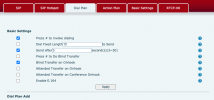
On Fanvil phones I have to actually press "dial" or hit "#" so the call is sent to the server (screenshot attached here).
There is a config page on the phone itself via web interface where I can sort of set this up, but I would hate to do it on every phone.
There has to be a better way.
Dotty
I have a test bench with 3CX running on AWS EC2, a Twillio SIP Trunk, the SBC on premises running on Debian, and 4 Fanvil X3U.
So far my tests are going well but it annoys me that I must hit "#", or hit the soft-button "dial" after dialing phones or extensions for the call to actually go out to the PBX.
How can I configure "auto-send"?
On my old system I just pick the headset or open the speaker, dial 124 and a second later extension 124 rings.
Same with external numbers, I dial 4073426334 and a second later it gets dialed, same with International numbers, etc.
On Fanvil phones I have to actually press "dial" or hit "#" so the call is sent to the server (screenshot attached here).
There is a config page on the phone itself via web interface where I can sort of set this up, but I would hate to do it on every phone.
There has to be a better way.
Dotty


