- Joined
- Aug 4, 2024
- Messages
- 1
- Reaction score
- 0
Hi all,
Can someone please help? One of our clients likes 3CX and wants to use the 'Update presence from Teams client to 3CX apps' feature, which allows them to change their status in Teams instead of 3CX when they are in a meeting. However, this feature does not work properly.
To clarify, our client has 3CX v20 update 2
We have enabled M365 for them and followed the Microsoft 365 Integration information provided: "How to Integrate your PBX with Microsoft 365 | 3CX," and the setup works perfectly.
I have tested the following and provided the results below:
- When we select 'Update presence from 3CX Apps to Teams Clients,' it works fine with no issues. Users can change their status in 3CX, and it updates their Teams status without a problem.
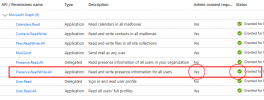
- When we select 'Update presence from Teams to 3CX apps' and click 'Authorize' as instructed, the user's status change to 'DoNotDisturb' in Teams does not update the 3CX status.
I can confirm that users have the required Microsoft 365 license, they have been added to Sync Users, and the 'Authorize' button has been pressed.
Any advice, solutions, or information would be greatly appreciated. Thanks!
Can someone please help? One of our clients likes 3CX and wants to use the 'Update presence from Teams client to 3CX apps' feature, which allows them to change their status in Teams instead of 3CX when they are in a meeting. However, this feature does not work properly.
To clarify, our client has 3CX v20 update 2
We have enabled M365 for them and followed the Microsoft 365 Integration information provided: "How to Integrate your PBX with Microsoft 365 | 3CX," and the setup works perfectly.
I have tested the following and provided the results below:
- When we select 'Update presence from 3CX Apps to Teams Clients,' it works fine with no issues. Users can change their status in 3CX, and it updates their Teams status without a problem.
- When we select 'Update presence from Teams to 3CX apps' and click 'Authorize' as instructed, the user's status change to 'DoNotDisturb' in Teams does not update the 3CX status.
I can confirm that users have the required Microsoft 365 license, they have been added to Sync Users, and the 'Authorize' button has been pressed.
Any advice, solutions, or information would be greatly appreciated. Thanks!