My Phone is not ringing

Status
Not open for further replies.

targettravelsqatar

New User
Joined
Jan 15, 2022
Messages
10
Reaction score
0
I have installed the 3CX in my android device and it giving notification for the ring but its not making the sound, I installed the 3CX in my another android devise and its working well, Could you please advise me why the device is not ringing..? The same device was worked well two days ago, Please help...!
 
What device? What Android version?

Have you tried enabling "Telecom API" in the app settings?
 
Hi, Its IQOO7 device from VIVO, How can I enabling "Telecom API" in the app settings?
 
Hi, Its IQOO7 device from VIVO, How can I enabling "Telecom API" in the app settings?
Go in the 3CX app settings and check if there's a checkbox for Telecom API. If there is, try enabling it.
 
  • Like
Reactions: targettravelsqatar
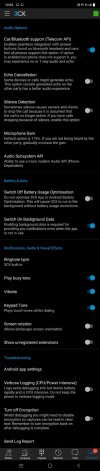
Could you please see the attachment and advice what has to be enabled...? I tried many ways
 

Attachments

  • screenshot.jpeg
    screenshot.jpeg
    71.8 KB · Views: 26
Hi @targettravelsqatar, thanks for the feedback.
From image seems the Telecome Api [Car/Bluetooth support (Telecom API)] is enabled.
Please disabled and retry.
If the issue not resolved, please send me in PM the verbose log report, after you enabled the buffer log size to the maximum.
  1. Enable Verbose Logs: “Android App Settings (top left hamburger menu) > Settings > Advanced > Troubleshooting > Verbose Logging”.
  2. Reproduce issue and “Generate Log Report”: Android App Settings (top left hamburger menu) > Settings > Advanced > Troubleshooting > Send Log Report.
 
  • Like
Reactions: Evolute IT
Hi Dear, How can i get your email address to send this..?
 
  • Like
Reactions: GiannosI_3CX
Hi @targettravelsqatar, thanks for the feedback.
From image seems the Telecome Api [Car/Bluetooth support (Telecom API)] is enabled.
Please disabled and retry.
If the issue not resolved, please send me in PM the verbose log report, after you enabled the buffer log size to the maximum.
  1. Enable Verbose Logs: “Android App Settings (top left hamburger menu) > Settings > Advanced > Troubleshooting > Verbose Logging”.
  2. Reproduce issue and “Generate Log Report”: Android App Settings (top left hamburger menu) > Settings > Advanced > Troubleshooting > Send Log Report.
 
You can send it to your email, upload it to ftp server (You can use the wetransfer.com if ftp is not available) and provide me the link in PM please.
 
I have only basic knowledge in IT :(, If you can provide the email address would be better, OR you can advise me how to provide you the link
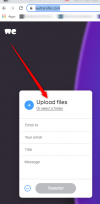
 
Please follow the steps below :
  1. Send the log report at your email
  2. Download the attachment when the email received (Filename : ACRA-report.stacktrace)
  3. Navigate to https://wetransfer.com/ and click on "I just want..."
  4. Upload the file there
  5. Provide me the generated link in PM
 
You can upload file here if this what are you seeing.
1642432910567.png
 
@targettravelsqatar I have download it. please delete your message. Log files must be send via private messaging and not in public threads.
 
Status
Not open for further replies.

Members Online Now

Forum statistics

Threads
111,832
Messages
589,278
Members
164,662
Latest member
DejanMDS