NEC DT900 issue

LTHPVisuals

SMB User
Joined
May 8, 2025
Messages
2
Reaction score
0
i have the free smb account, as well as 2x NEC DT900 voip phones. How do I go about successfully adding these to a user each? Also, no welcome email was sent out to my new user when I made them?
 
Hello @LTHPVisuals,
Regarding the NEC DT900 phones — these models are not officially supported by 3CX. You can find the full list of supported devices here .

That said, it may still be possible to register them manually by creating a custom provisioning template and configuring the phones with the SIP details directly. However, this requires manual setup and is not guaranteed to work smoothly. Additionally, if the phones are on a remote network, you’ll need to use a 3CX SBC to ensure proper communication with the system.

As for the welcome email not being sent, please double-check that the email address on the user’s extension is correct. If it looks fine, try deleting the extension and re-adding it as that can often re-trigger the welcome email.
 
Hello @LTHPVisuals,
Regarding the NEC DT900 phones — these models are not officially supported by 3CX. You can find the full list of supported devices here .

That said, it may still be possible to register them manually by creating a custom provisioning template and configuring the phones with the SIP details directly. However, this requires manual setup and is not guaranteed to work smoothly. Additionally, if the phones are on a remote network, you’ll need to use a 3CX SBC to ensure proper communication with the system.

As for the welcome email not being sent, please double-check that the email address on the user’s extension is correct. If it looks fine, try deleting the extension and re-adding it as that can often re-trigger the welcome email.
i wil give the email thing a go. regarding the dt900's, do you know of any walkthroughs for this that will assist, or is it purely trial and error until I get something to work? I am new to 3cx.
 
i wil give the email thing a go. regarding the dt900's, do you know of any walkthroughs for this that will assist, or is it purely trial and error until I get something to work? I am new to 3cx.
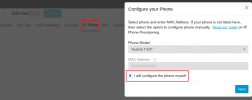
Okay I don't extensive experience with this but make sure that your phone is on SIP mode then you can try setting them up manually by entering the SIP details from the 3CX extension (extension number, auth ID, password, SIP server) into the phone’s web interface by logging to the assigned IP of the phone.

1746733182210.png

Note : Configure the phone to point to the SBC as the SIP server, so basically the SIP server will be your SBC.
 
Former NEC dealer here, you will need to ensure the NEC DT900 sets have standard SIP firmware on them for use with NEC Univerge 3C. There are two flavors of NEC firmware: proprietary and standard-SIP. Univerge 3C sets use standard SIP.
 

Members Online Now

No members online now.

Forum statistics

Threads
111,831
Messages
589,277
Members
164,660
Latest member
RJenkinsROCK