No Ring on the incoming call

Status
Not open for further replies.
I installed a new client yesterday with 6 Android phones, same problem.
 
Hi @WifxMain,
Could you please check the following:
- Chat notifications working?
- Is the app in silent mode?
- What appeared in Settings -> Advanced -> Notifications, Audio .... -> Ringtone Type?
- Device's OS version?
 
Hi @WifxMain,
Could you please check the following:
- Chat notifications working?
- Is the app in silent mode?
- What appeared in Settings -> Advanced -> Notifications, Audio .... -> Ringtone Type?
- Device's OS version?
I found what the issue was :
Setup-> apps ->details click on notifications and enable allow sounds.
Can you change the install so that it is enabled by default ?
 
I'm facing same issues, Any solutions..?
 
My LG G8s (Android 11) does only ring when it is unlocked. When locked there is only a visual notification on the lockscreen. Very annoying. Tried many suggested fixes already.
 
You have to join the BETA program for that.
Launch the Play Store, search for 3CX and in the Apps information page scroll down to where it reads "Join the Beta" and press "Join"
 
  • Like
Reactions: WifxMain
I did too, I'm still facing the issue,
 
Any updates, Please help.......!
 
I can confirm this issue on multiple phones and multiple PBXs. we are supporting currently over 250 3CX installations as a platinum partner and solution provider.

This looks like a bug introduced in 18.0.7.42 mobile client and also present on 18.0.8.82 beta client.

As a possible workaround change 3cx client ringtone from 3cx built-in to system default or custom. Strange point is that on some phones system default ring tone. i.e. the Android one's is still not working with 3cx app, so seems the problem is deeper, the 3cx app can't play it, beside its own one.

We raised a ticket to 3cx support, expecting resolution.
Regards
 
  • Like
Reactions: WifxMain
I had one person with this issue and I had tried uninstalling the app and reinstalling . I wanted to test to see if it was a problem with her phone or her account, so I deleted the data from the app on my phone, and scanned her QR code to register my phone on her account. I placed a test call, and her phone rings now; mine did not though it's the same account. At that point, I didn't care though cause hers works, so I can close my ticket.
Hope this helps someone else.
 
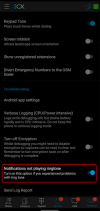
In the next Beta Release that will come after 18.0.8.86 which should come in the next few days, we have introduced the following option that should solve the issues:
1645434489902.png

If user has a problem, they need to toggle this.

Effectively the issue is that we have implemented the recommended way the Android documentation says should be to handle notifications, however it seems that many manufacturers have not adopted this despite it being the recommended way.
So this option we will introduce will do exactly that, toggle between the recommended way and the "old" way of handling notifications.
 
I just updated to 18.0.9.98, activated the new option and ... my phone rings! Solved the issue for me.
 
Status
Not open for further replies.

Members Online Now

No members online now.

Forum statistics

Threads
111,831
Messages
589,277
Members
164,660
Latest member
RJenkinsROCK