Office 365 Azure 3CX app admin consent

Status
Not open for further replies.

paulsummers

Customer
Basic Certified
Joined
Feb 18, 2019
Messages
68
Reaction score
6
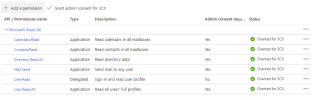
We've been using Microsoft Office 365 for webclient login for several years. Today, without change to the Azure enterprise app or 3CX config, users are unable to log in as they're being notified Microsoft admin app consent is required. The Azure app permissions, all four API permissions show admin consent for the application - which has been granted. We're re-granting admin access but still no change for users. Anyone else seeing similar issues?
 
Being in urgent need of a fix, I'm tempted to delete and recreate the integration as a hopeful quick fix. f we delete the Azure enterprise app and recreate it, can someone 3CX confirm what happens to the existing Microsoft 365 sync'd extensions?
 
You need to ensure that when you grant consent to the admin (365 global admin logged in to the Azure portal) then navigate back to the management console and from the M365 integration section > Configure tab > press the 'Sign in to Microsoft 365', under Step 3 and enter the 365 global admin credentials to them Press Accept in the window that will pop up.

If in doubt reconfigure a new app registration, this will not affect your current extensions, sync is one way from 365 to 3CX and when removed the extension will nto get deleted, you may lose the synced contacts, if contact sync was enabled and working, until the next sync, once the new app is configured.

Although note all the required Graph permissions:
1681403595633.png
 
Status
Not open for further replies.