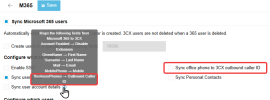
These are two separate fields that serve different purposes in the M365/Teams integration. The Business Phone field (from Entra ID/Azure AD) is what gets pulled in when you enable 'Sync user account details.' This populates the user's 3CX extension details. The 'Sync office phone to 3CX outbound caller ID' checkbox is a separate override — it takes whatever is in the Office Phone field in M365 and stamps it as the outbound CallerID on that extension. If you want Business Phone and Outbound Caller ID to be different, simply leave that 'Sync office phone to outbound caller ID' checkbox unchecked. Then set the Outbound Caller ID manually on each extension under Users > Edit > Options tab. The Business Phone will still sync from M365 without touching the CallerID. Just make sure your SIP trunk is configured to pass the CallerID through (check your trunk's 'Send CallerID' setting), otherwise the manually set value won't go out on the wire anyway.